Web App / Designer Tool · 2026
MockSnap: Designing and Shipping a Free, Private Device Mockup Generator
Case study: how I designed and shipped MockSnap, a free device mockup generator that runs in the browser, needs no sign-up, and never uploads screenshots.
Project Details
My Role
Designer & Builder. Everything, from idea to live product:
- Problem Framing & Competitive Review
- Product Scope & Pricing Model
- UX & UI Design
- Front-end Build
- Launch & Iteration
Duration
Launched October 14, 2026. Iterating since, with the first feature update on November 14, 2026.
Team
- 1 Designer & Builder (me)
The Impact
Shipped and live at mocksnap.app. Free to use, with a Pro tier on a waitlist.
Highlights
- Privacy as a product decision, not a policy page. Screenshots are processed only in the browser and never uploaded. Unreleased app screens never leave the user's machine.
- No sign-up between the user and the export. The whole job, from dropping in a screenshot to downloading an image, happens without an account.
- Exports sized for where the image is going. Presets for slides, Dribbble, Instagram, Stories, link previews, and X headers replace guessing pixel sizes.
- A designer who ships. Unlike a concept case study, this one is live. Anyone can open it and judge the decisions for themselves.
60-Second Summary
The problem: Every launch post, App Store page, and portfolio piece needs a device mockup. Most tools that make them ask for an account, a subscription, or an upload of your unreleased screenshots before you get a single image out.
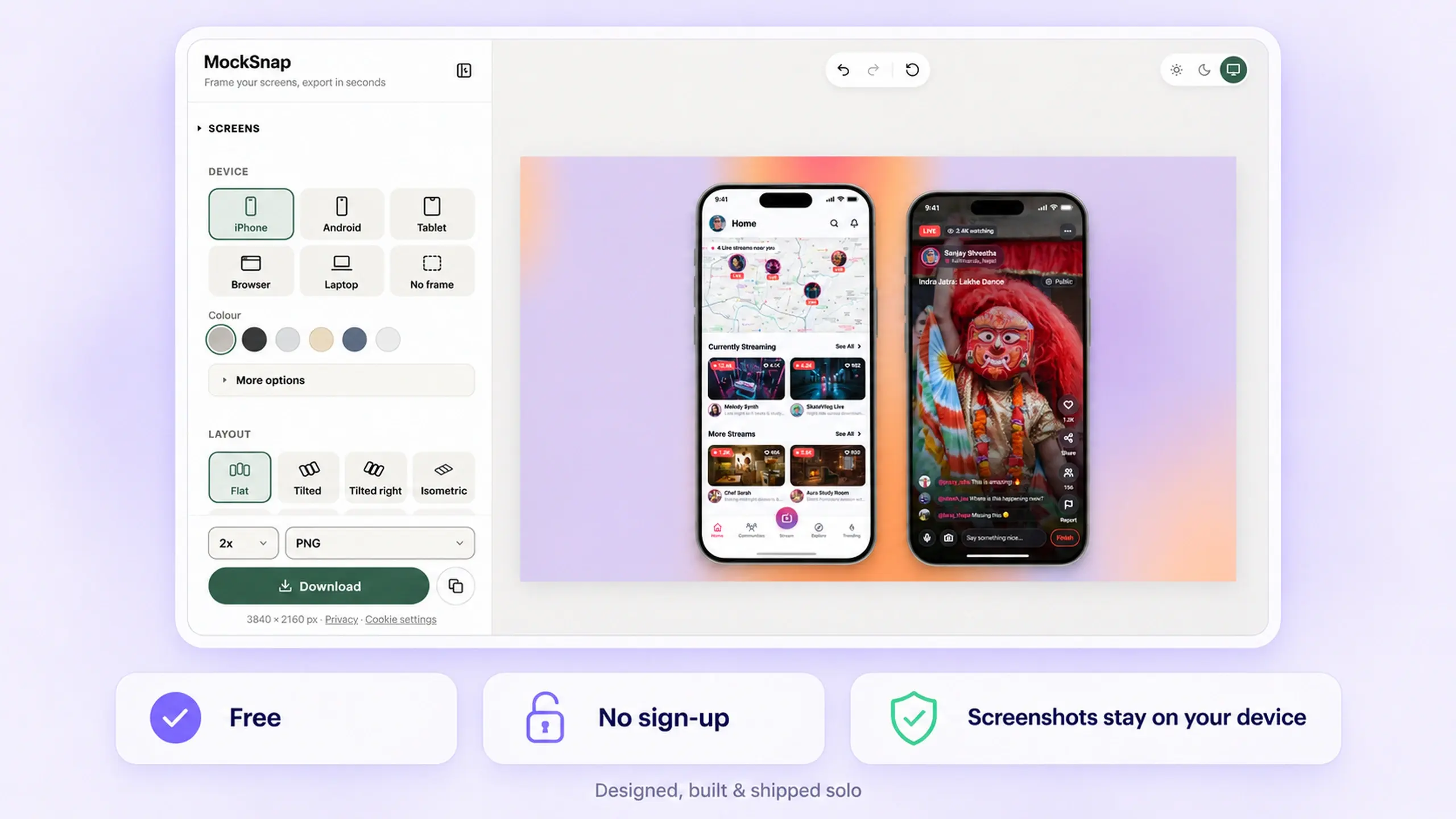
What I built: MockSnap, a free device mockup generator that runs entirely in the browser.
- Drop in screenshots, pick a device, layout, and background, export. That's the whole flow.
- No sign-up. No account stands between the user and the download.
- Nothing is uploaded. Screenshots stay on the user's machine.
My role: Solo. I framed the problem, scoped the product, designed the UX and UI, built it, and shipped it.
Outcome: Live and free at mocksnap.app. A Pro tier is planned, with a waitlist already open.
Try MockSnap live(opens in a new tab)
The Problem
Mockups are one of those small jobs that come up every single time something ships: a launch tweet, a Product Hunt page, a Dribbble shot, a case study cover. The job itself is simple. The tools around it often aren't.
Common friction points:
- Accounts and paywalls in front of basic exports
- Uploading screenshots to a server, which is a real concern when the screens belong to a product that hasn't launched yet
- Guessing output sizes for each platform, then resizing afterwards
How do you make a five-minute job actually take five minutes, without asking people to trade away their screenshots or their email address?
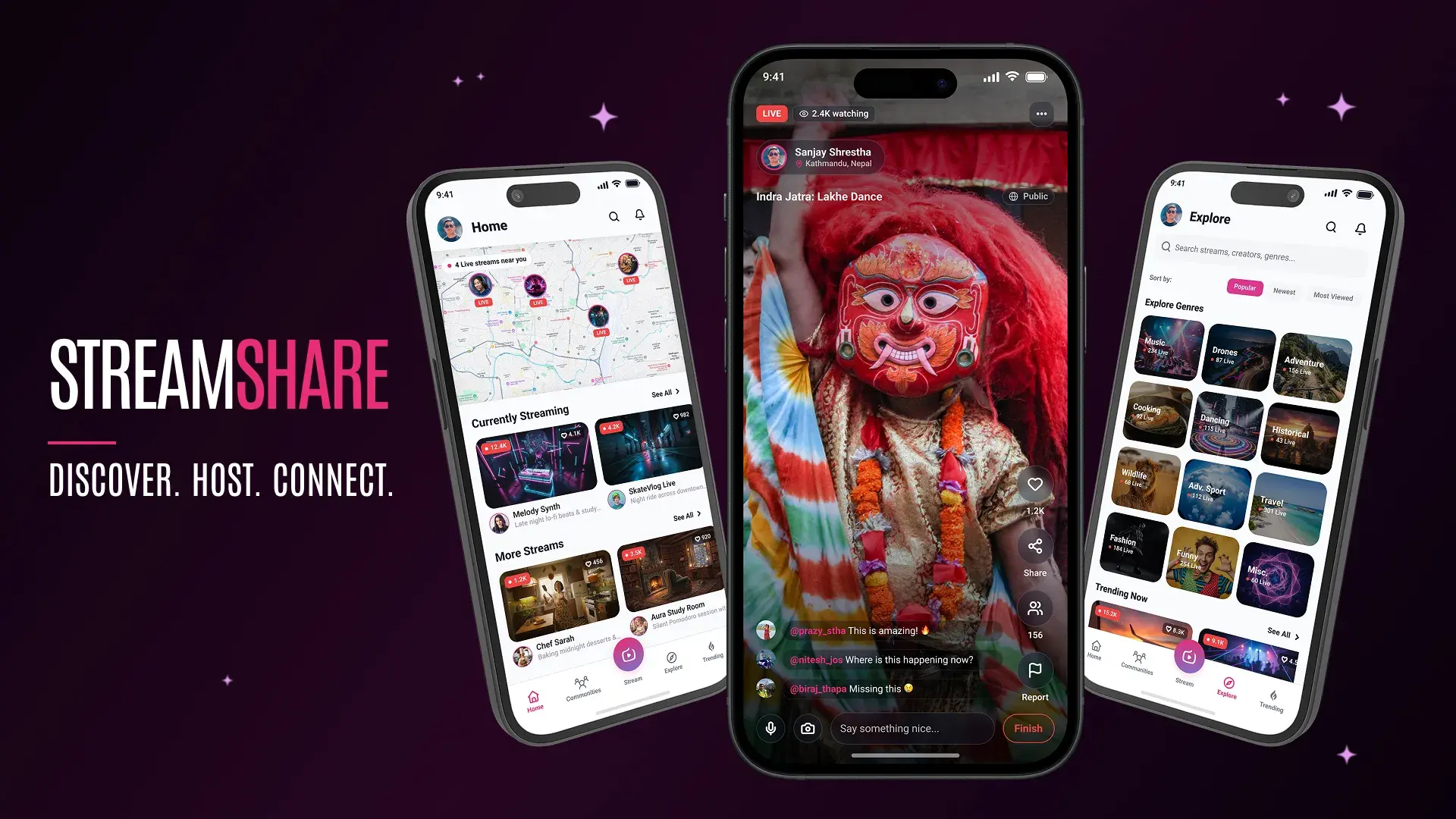
I ran into this on my own portfolio. Case studies like StreamShare needed clean device mockups, and the job kept taking longer than it should. So I built the tool I wanted to use.
Who It's For
The site states it plainly: indie developers, designers, and anyone launching something.
These users share a few traits:
- They need a good-looking image fast, usually right before posting something
- They often work with unreleased screens, so privacy matters
- They publish to many different places, each with its own image size
Key Design Decisions
1. Browser-Only Processing
Screenshots are processed in the browser and never uploaded.
- Unreleased app screens never leave the user's machine
- No upload step means no waiting on a server
- Privacy is a property of the architecture, not a promise in a policy page
2. No Sign-Up, Free Core
Every device, layout, background, and export option is free, and the site commits to keeping it free.
- The first thing a user does is the actual job, not a registration form
- Monetization is planned as an optional Pro tier on top, not a paywall around the basics
A tool you reach for once a month has to earn trust in the first ten seconds. A sign-up wall spends that trust before it's earned.
3. A Small Set of Strong Choices
Instead of an open-ended canvas, MockSnap offers curated options that cover most launch needs:
| Choice | Options |
|---|---|
| Devices | iPhone, Android, tablet, browser window, laptop |
| Layouts | Flat, tilted, isometric, cascade, fan |
| Backgrounds | Twelve gradients, solid, image, or transparent |
| Text | Built-in title and subtitle |
Fewer, better defaults mean less time deciding and more time shipping.
4. Export Presets Mapped to Destinations
Users don't think in pixels. They think "this is for Instagram" or "this goes in my slides."
- Presets for 16:9 slides, Dribbble, Instagram, Stories, link previews, and X headers, plus custom sizes
- PNG, JPG, or lossless WebP at 1x, 2x, or 3x, up to 5760 px
- Copy to clipboard for pasting straight into a post or doc
How It's Built
I designed and built MockSnap myself, which meant design decisions could go all the way down to the rendering code.
- One render function for preview and export. The preview and the downloaded file are drawn by the same code, so what you see is exactly what you get
- Real 3D perspective. Tilted layouts are warped onto the canvas with WebGL2, which keeps perspective correct and screenshots sharp
- Autosave without an account. Settings live in local storage and images in IndexedDB, so work survives a refresh and never leaves the device
- Built for keyboards too. Shortcuts for undo, redo, download, paste, and the sidebar, and a layout that works down to 320px
- Two small deployments. The landing page and the editor each run as their own Cloudflare Worker, and the Pro waitlist is stored in Cloudflare D1
Outcome
- Shipped and live at mocksnap.app
- Free to use, no account required
- MockSnap Pro waitlist open for future paid features
- One day from first commit to live, on October 14, 2026, including the landing page, privacy policy, and cookie consent
- First update a month later: drag-to-reorder screens, and export locked until a screenshot is added so nobody downloads an empty frame
Reflection
On client work, the brief, the budget, and the roadmap belong to someone else. On MockSnap, every trade-off was mine, and that changed how I made them.
Scope was the hardest design problem.
- Every extra option looked useful on its own: more devices, more layouts, a free-form canvas
- Each one also added a decision for someone who just wants an image before they post
- Keeping the choices small and curated meant saying no to features I would have happily designed for a client
The most important decisions don't appear on any screen.
- Where screenshots are processed and whether an account is needed shaped the experience more than any layout or color choice
- Owning the build meant I could make privacy a property of the architecture, instead of handing a spec to engineering and hoping it survived
Using it on my own work kept me honest.
- Every image on this page was made in MockSnap from my StreamShare concept screens
- Using the tool on a real portfolio piece showed me quickly what felt slow and what was missing
What's next: MockSnap Pro, built on top of a core that stays free.
Designing for a client tests whether I can solve someone else's problem. Shipping my own product tests whether I can decide what's worth solving.
Key Takeaways
- Privacy can be a design decision. Choosing where processing happens shaped the product more than any screen did.
- Removing steps is a feature. No sign-up and no upload are the core of the experience, not missing pieces.
- Shipping closes the loop. Designing something real and putting it in front of people tests decisions in a way a concept never can.
Tools Used
Frequently Asked Questions
Is MockSnap free?
Does MockSnap upload my screenshots?
Why include a personal product in a design portfolio?
More Work
Other Case Studies
Let's build something meaningful together.
Whether you're building a new product, improving an existing experience, or exploring AI-powered workflows, I'd love to hear what you're working on.
Get in Touch