Enterprise · 2019–Present
Decisions AI: The Meeting Platform I Lead Mobile Design For
Seven years as the only designer on an enterprise Teams meeting app — a direct account of the role, built entirely from public sources, on a project I can't discuss beyond that.
Project Details
My Role
Lead Product Designer. Lead Product Designer, sole designer on the mobile app since it started:
- Feature Research (competitive analysis, client calls, direct feedback)
- End-to-End UX/UI Design (wireframing, interaction, visual, prototyping)
- Iteration (design, ship, observe, redesign)
- Product Management (specs, backlog, client point of contact)
Duration
2019–Present, ongoing
Team
- 1 Lead Product Designer (me), sole designer on mobile since inception
- 2 dedicated mobile developers, additional engineers rotating in as needed
- 1 dedicated PM, joined recently as the workload grew
The Impact
- 5,000+ organizations on the platform, spanning enterprise, healthcare, and government bodies
- 4.4–5.0/5 across G2, Capterra, the App Store, and Google Play — see the ratings table below
Highlights
- Seven years, sole designer. I've owned mobile design end-to-end since the app started in 2019 — the client's only mobile designer the entire time, with a dedicated PM joining only recently as the workload grew.
- Built natively for Microsoft 365. Agenda building, in-meeting decision and task logging, and AI-generated recaps, integrated directly with Outlook, Word, Excel, PowerPoint, OneNote, SharePoint, and Microsoft's Copilot and OpenAI infrastructure.
- No open sign-up, by design. Both free and paid tiers require an existing Microsoft 365 or Teams organizational account, with IT admin approval in Azure AD before anyone in that org can install or sign in.
- AI as part of my own process, not just the product's. Claude, ChatGPT, V0, Lovable, and Figma's AI tools now sit inside my own workflow — early design direction, quick prototyping, interaction ideas, copywriting, competitive analysis — changing how fast I can move on the parts of the job that used to take longest just to get started on.
A note on this page
I want to be direct about what this page is and isn't. It isn't the kind of case study where I walk you through a problem, what I learned, and the decisions that followed. I can't write that page honestly without exposing client conversations, internal data, and product reasoning that's covered under an active NDA.
What follows instead is a straightforward account of the product I work on, and the role I actually hold, built entirely from public sources plus my own description of my job. The signal I'd point you to instead: an active enterprise client has kept me as its only mobile designer for seven years and grown my scope into product management along the way. That's not a research narrative, but it's not nothing either.
About Decisions AI
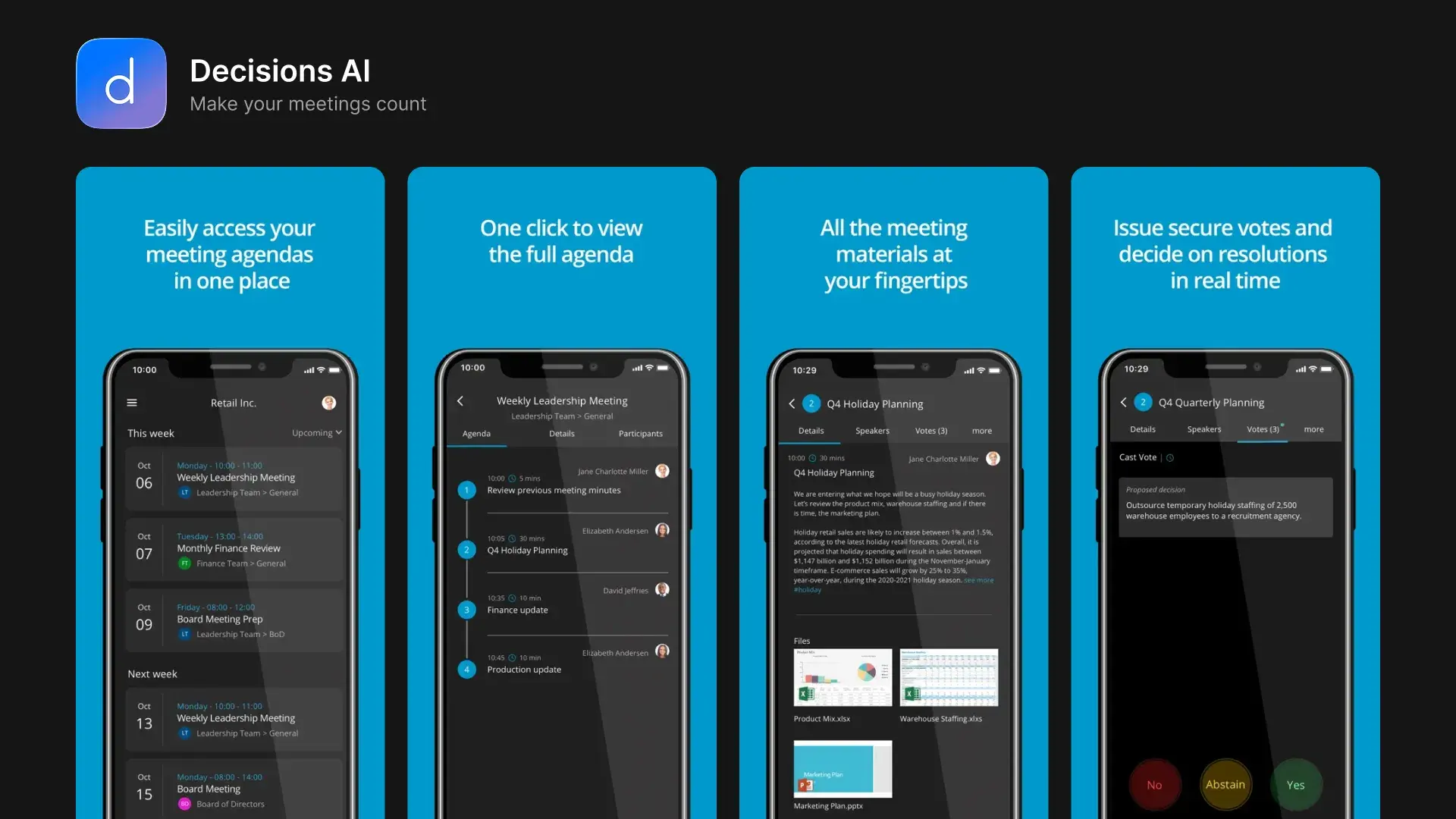
Decisions is an AI-powered meeting management platform built natively for Microsoft Teams and Microsoft 365, and a two-time Microsoft App Award winner (1st place, Best Office Integration, 2018; 3rd place, Best Overall Apps, 2019). It covers the full meeting lifecycle:
- Before: agenda building
- During: decision and task logging
- After: AI-generated recaps and minutes
It integrates directly with Outlook, Word, Excel, PowerPoint, OneNote, SharePoint, and Microsoft's Copilot and OpenAI infrastructure, and it's built for organizations that need everything to stay inside their own Microsoft 365 tenant.
My focus within the broader product is Decisions AI, the mobile companion app: the one surface I've designed from the ground up since I joined in 2019. I also own UX/UI for the platform's other integrated surfaces (Teams, Outlook, and the rest of Microsoft 365), which already had interfaces in place when I joined: reusing components where they hold up, designing new ones where something genuinely new is needed, then reviewing the implementation and iterating on it after it ships.


Requires an organization already on Microsoft 365 or Teams, with IT admin approval for the Decisions enterprise app in Azure AD (via the M365 Admin Center / Teams Admin Center). Doesn't apply to you?
Per the public listings and support documentation, the app includes:
- Agenda building and templates
- Real-time decision and task logging
- Secure in-meeting voting
- AI Recap, AI Minutes, and an AI Agenda Assistant
- Task sync and assignment
- A document viewer with text selection and annotation
- Meeting transcription support for in-person meetings
The company's own site lists 5,000+ organizations on the platform, with use cases spanning leadership teams, boards, audit committees, and government bodies.
Decisions does have a free tier, the Small Teams plan, for up to 5 users, but it's only available to organizations already on Microsoft 365 with 30 or fewer users on their tenant, for the same reason: no personal freemium path exists.
Public recognition
| Source | Rating |
|---|---|
| G2 | 4.4 / 5 (401 reviews) |
| Capterra | 4.5 / 5 (81 reviews) |
| App Store | 5.0 / 5 (6 ratings) |
| Google Play | 4.4 / 5 (~90 reviews), 50K+ installs |
What users say
Review volume on both stores is small (typical for a B2B, Teams-embedded app where most users never leave a rating), so I'm not treating this as statistically meaningful. It's still the only direct, public client voice available to quote, so here it is as-is, pulled verbatim from the live listings (re-checked against the live App Store and Google Play pages, August 2026):
“Integrates my meetings easily from my computer to my phone super easy to view my same agendas here and there and make changes on the go. Great app.”
My role
Lead Product Designer: sole designer on the mobile app since it started, and owner of UX/UI across the platform's other integrated surfaces as well.
I own the UX/UI design process across the product, building mobile from the ground up and extending, adding to, and reviewing design on the platform's other integrated surfaces. That's everything short of writing the code:
- Feature research: competitive analysis, sitting in on client calls directly, and gathering feedback that feeds into design direction
- End-to-end design: wireframing when a flow genuinely calls for it, interaction design, visual design, and prototyping
- Iteration: design, ship, observe how it lands, redesign
- Product management: for most of this project, I've also written product specs, managed the backlog, and been the primary point of contact for client feedback, feature requests, and concerns, alongside my own data analysis to back up direction
That last point is the one I'd ask a reader to sit with: a team that starts as "one designer, two developers" doesn't stay that shape for seven years, and doesn't hand its designer the backlog and the client relationship, unless the work is holding up. A dedicated PM joined recently as the workload grew. It's the first time in the project's history the design and PM functions haven't sat with one person.
The team otherwise stays lean: two developers dedicated to mobile, with additional engineers rotating in and out over time.
One recent shift worth naming: I've started using AI tools, Claude, ChatGPT, V0, Lovable, and Figma's AI features (Figma Make, Chat Agents), as part of my own process, for early design direction, quick prototyping, interaction ideas, copywriting, and competitive analysis. It's changed how fast I can move on the parts of the job that used to take longest just to get started on.
What I'm not showing you
Everything above is either publicly checkable (the product listings, the reviews, the Microsoft Award announcements, the company's own site) or a description of my role that I can speak to without touching anything confidential.
What I'm intentionally leaving out: specific research findings, usage data, internal metrics, unreleased features, and the reasoning behind any particular design decision. That's not me being cagey for effect. It's the actual boundary of what I can share about a live product under NDA, and I'd rather be direct about that boundary than write around it and hope no one asks.
Tools Used
Frequently Asked Questions
Why doesn't this case study include research, metrics, or design rationale?
What exactly do you own on this project?
Can I try Decisions myself?
How reliable are the ratings you list?
Related Reading
From the Blog
More Work
Other Case Studies
Let's build something meaningful together.
Whether you're building a new product, improving an existing experience, or exploring AI-powered workflows, I'd love to hear what you're working on.
Get in Touch