Agent UX
Part of AI Product Design →The AI Agent Glossary Every Designer Needs in 2026
Agent, orchestration, grounding, guardrails — agentic AI vocabulary is spreading through product meetings. Here's what each term means for design work.
Sit in on enough product meetings this year and you'll hear a new vocabulary creeping into the conversation, one that used to belong strictly to engineering. Orchestration. Grounding. Human-in-the-loop. Nobody stops to define them, and nodding along without knowing what they mean is a fast way to miss the actual design decision buried inside the jargon.
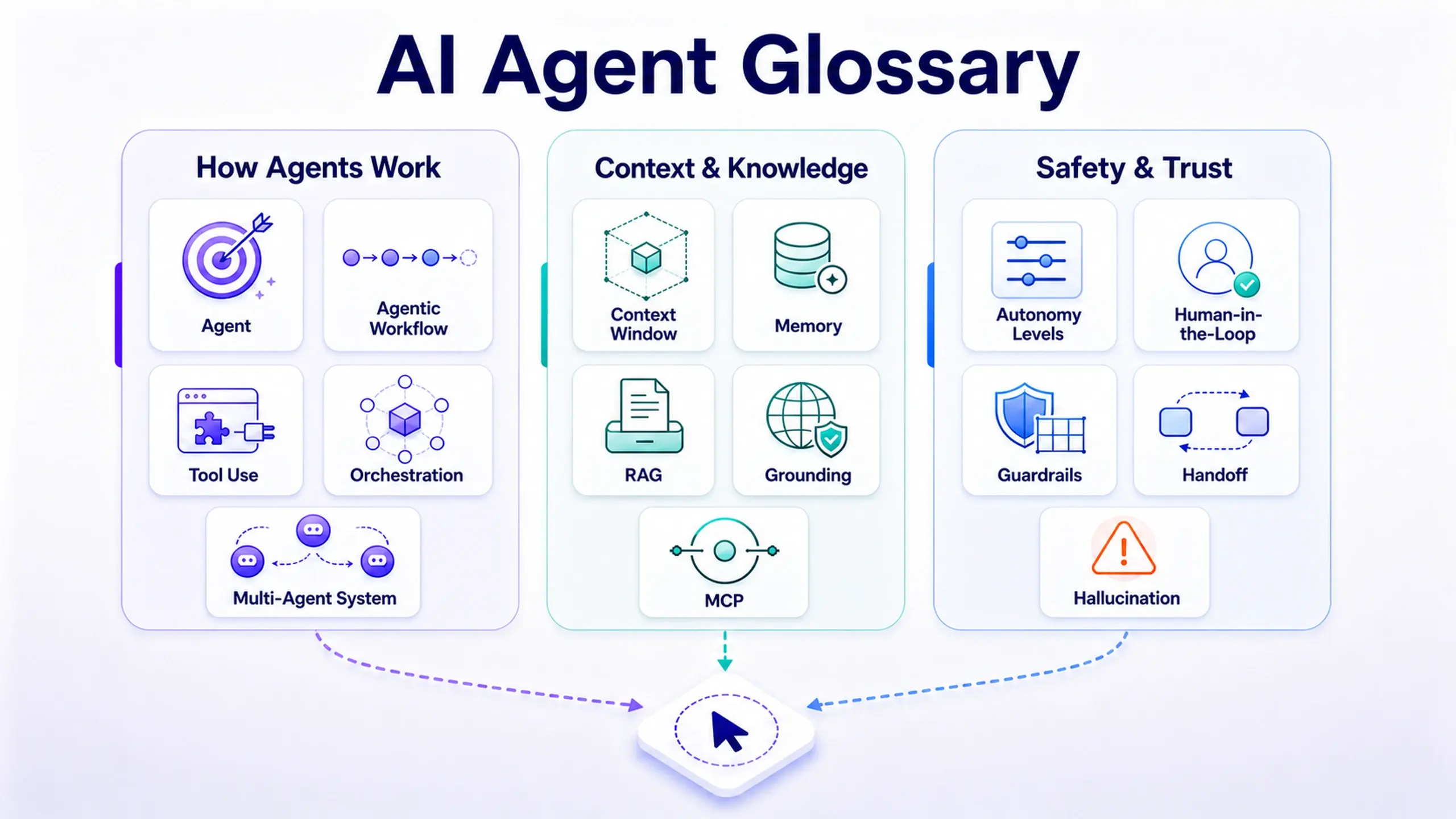
None of these fifteen terms require an engineering background to use well. They require knowing what each one changes about the product you're designing. This is the glossary version: fifteen terms, grouped by what they actually govern, written for the person deciding how the thing behaves, not the person implementing it.
Group 1: how an agent actually gets things done
These five describe the machinery underneath: what separates "an agent" from a chatbot that answers questions and stops.
Agent
Software that pursues a goal on its own, rather than only responding when asked.
An agent perceives its situation, decides what to do next, and acts, in a loop, without a person prompting each individual step. That's the line that separates it from a traditional feature: a search bar responds to a query, an agent pursues an outcome.
Agentic workflow
A goal broken into steps the agent runs on its own, checking its own progress until the job is done.
Instead of one request and one response, the agent plans a sequence and works through it, adjusting as it goes. The design question shifts accordingly: you're no longer shaping a single output, you're shaping what "finished" is allowed to mean before the agent decides it's done.
Tool use (function calling)
The agent calling real tools and APIs (search, send, book) to affect the world beyond generating text.
This is what makes an agent more than a very articulate chatbot. A model that can only talk gives advice. A model that can call a tool can actually send the email, book the appointment, or update the record, which is exactly why the guardrails around tool use matter more than the guardrails around a text reply.
Orchestration
Coordinating steps, tools, and agents so a single, coherent outcome comes out the other end.
Orchestration is the layer that decides sequencing: what happens first, what waits for what, and what happens if step three fails halfway through.
For design, this is where a lot of invisible failure modes live: a well-behaved agent inside a poorly orchestrated sequence can still produce a broken experience, because the breakdown is between steps, not inside any one of them.
Multi-agent system
Several specialized agents working together: a planner, a worker, and a checker, for example.
Instead of one generalist agent trying to do everything, a multi-agent system splits the job the way a team would: one plans, one executes, one verifies. The design implication is the handoffs between them become a real UX surface. What happens when the checker disagrees with the worker is a design decision, not just an engineering one.
Group 2: where its context actually comes from
An agent's output is only as good as what it can see. These five terms describe what it knows and where that knowledge comes from, arguably the group most directly design-adjacent, because context gaps show up to users as confusion or wrong answers.
Context window
Everything the model can process as context at a given time, and it's finite.
As a conversation or task grows, older information may need to be summarized, retrieved again, or dropped entirely to make room. Design implication: a long-running agent interaction isn't infinite memory by default. Somewhere, older context is being managed, compressed, or forgotten, and the user experience of that forgetting is worth designing on purpose, not discovering by accident.
Memory
Information an agent stores and retrieves beyond the immediate context, enabling continuity across interactions.
Memory is what lets an agent remember your preference from last week without you restating it. It's also where a genuinely difficult design problem lives: how does a user see what the agent remembers about them, and how do they correct it when it's wrong?
RAG (retrieval-augmented generation)
Pulling in relevant documents or data at answer time to ground a response in real facts.
Instead of relying only on what a model learned during training, RAG fetches current, specific information (a policy document, a product spec, a customer's account history) and feeds it in before the model answers. This is one of the more effective tools against a model confidently making things up, because it gives the answer something real to point back to.
Grounding
Connecting an agent's responses to relevant external information (documents, databases, retrieved sources) to improve factual reliability.
Grounding and RAG are closely related; RAG is one common way to achieve grounding. The distinction worth holding onto for design purposes: an ungrounded agent is answering from vibes, however articulate those vibes sound. Any interface that lets a user see or check the source behind an answer is doing grounding work at the UX layer, not just the model layer.
MCP (Model Context Protocol)
A shared standard for connecting agents to outside tools and data sources.
MCP is plumbing, not a design decision by itself, but it's the plumbing that determines what an agent is actually capable of reaching. Anthropic introduced MCP as a common way for AI systems to connect to the tools and data they need, the same way a universal port replaces a drawer full of incompatible cables. Worth knowing the name if a teammate mentions it. It usually means "what can this agent actually plug into," which is a real constraint on what you can design around it.
Group 3: keeping it safe and keeping it human
The last five aren't about capability. They're about trust: the terms that come up whenever the conversation turns to how much should this thing be allowed to do on its own.
Autonomy levels
The degree of independent action an agent is allowed to take, from assistance and recommendations up to actions requiring little or no human approval.
This is rarely all-or-nothing in a well-designed system. The honest design question isn't "should this agent be autonomous," it's "autonomous at which specific step, and supervised at which other one." Most useful agent products are a mix, not a single dial.
Human-in-the-loop (HITL)
Checkpoints where a person reviews or approves before the agent is allowed to continue.
A checkpoint that exists on paper but gets rubber-stamped in practice isn't oversight. It's a compliance box wearing the language of oversight.
Designing a real HITL checkpoint means giving the reviewer enough context and enough time to actually catch a problem, not just a button between generation and shipping.
Guardrails
The rules and limits that keep behavior safe, in-policy, and on-scope.
Guardrails are the boundary conditions decided in advance, so the agent isn't improvising the answer to "should I actually do this" in the middle of doing it. Where those boundaries sit (what's allowed, what needs a human, what's off-limits entirely) is a product decision as much as a safety one.
Handoff
Passing a task from agent to human, or agent to agent, with the context intact.
The failure mode worth watching for isn't the handoff itself. It's a handoff that loses context on the way through, forcing the person (or agent) on the receiving end to reconstruct what already happened. A handoff that makes someone ask "wait, what has it already tried?" is a broken handoff, regardless of how good the underlying agent is.
Hallucination
Output that sounds confident but is simply wrong or invented.
The most dangerous hallucination isn't the obviously wrong one. It's the plausible one that reads exactly like every correct answer around it. This is precisely why grounding, RAG, and human-in-the-loop review all exist: none of them make hallucination impossible, but each one gives a confidently wrong answer a chance to get caught before it ships.
Why the vocabulary is worth learning on purpose
- It changes what questions you ask in a planning meeting. "What's the autonomy level here?" and "is this grounded or not?" are sharper, more answerable questions than "is the AI part good."
- It changes how you evaluate a vendor pitch. A tool that claims to be "agentic" but can't describe its own guardrails or handoff behavior is describing a demo, not a product.
- It changes how you collaborate with engineering. Shared vocabulary is the fastest way to stop a conversation from stalling on "wait, what do you mean by that."
Frequently asked questions
Do I need an engineering background to use these terms correctly?
What's the difference between grounding and RAG?
Is 'agentic workflow' just a rebrand of automation?
Which of these terms matters most for a designer just getting started with agentic AI?
Before you sit in the next AI planning meeting
- Pick the three terms from this list you'd have the hardest time explaining out loud
- Ask your team which autonomy level the current agent project actually targets, not the one everyone assumes
- Check whether your product's human-in-the-loop checkpoint is a real review or a rubber stamp
- Bookmark this list. The vocabulary will keep showing up faster than most teams standardize on it
This post was edited with AI assistance for clarity and formatting.

Sanjay Shrestha
Senior Product Designer · CUA™ Certified
15+ years designing enterprise SaaS, B2B, and government digital products. Currently at Decisions.
Keep Reading