Agent UX
Part of AI Product Design →From UX to AX: How Experience Design Is Evolving From Users to AI Agents
UX isn't being replaced; the user is expanding. How design moved from screens people operate, to AI people steer, to products AI agents use for them.
"AX" is showing up in job posts, conference talks, and product roadmaps, and it rarely means the same thing twice.
- Some people use it for AI Experience: designing how people work with AI.
- Others mean Agent Experience: designing products so AI agents can use them.
Both are real, and both grew out of traditional UX.
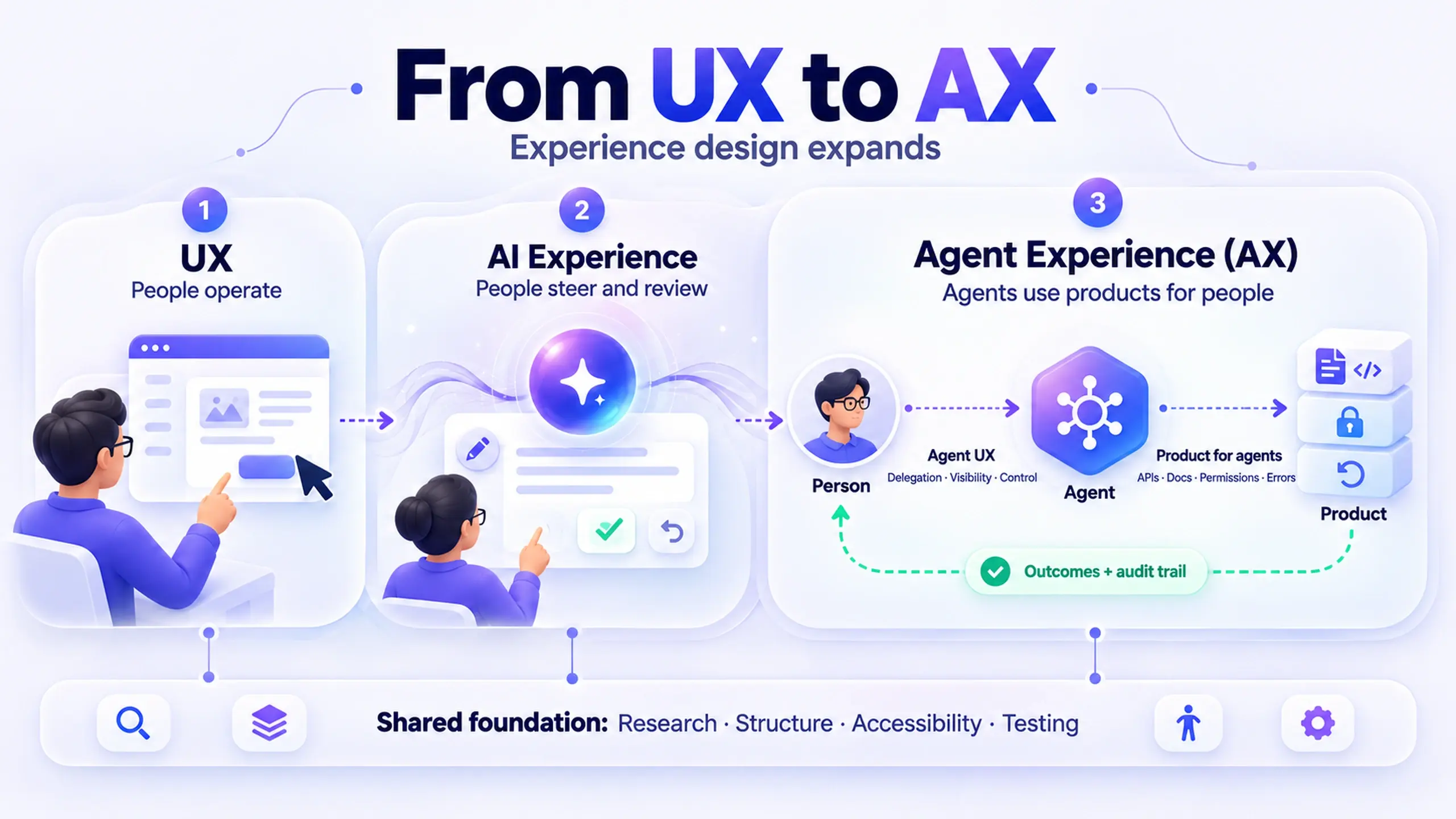
The short answer: the move from UX to AX expands two things: who does the work, and who counts as a user. Nothing gets replaced.
- Traditional UX designed interfaces that people operate step by step.
- AI Experience designs outcomes that people describe and an AI produces.
- Agent Experience designs products that AI agents can discover, understand, and act on, on a person's behalf.
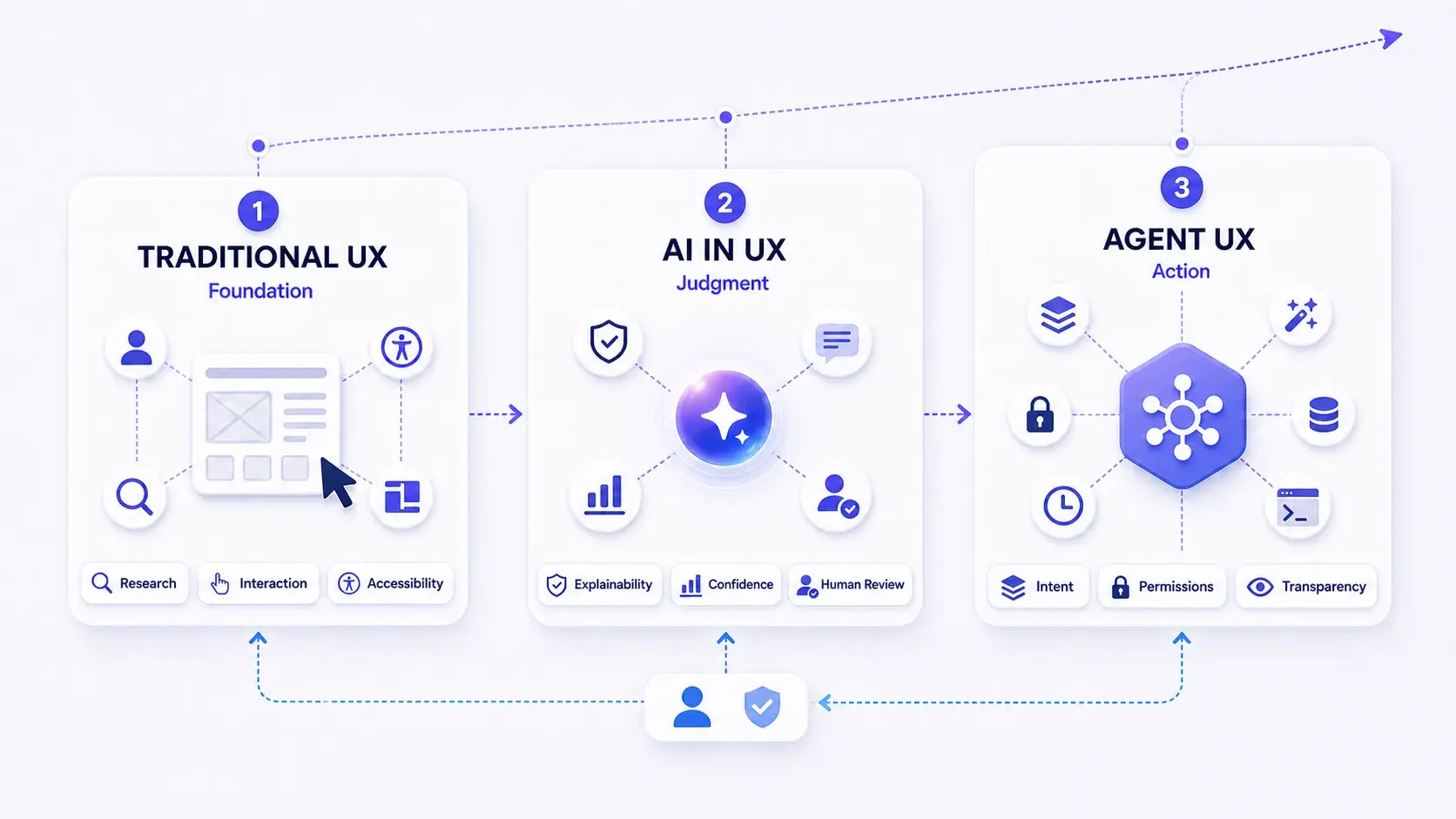
Each stage adds a question to the designer's job without removing the one before it:
- UX: Can people use it?
- AI Experience: Can people trust it, steer it, and correct it?
- Agent Experience: Can an agent use it for someone, and can that someone stay in control?
This guide walks through how we got here, what the work looks like today, where it's likely heading, and what to learn next depending on where you are in your career.
I've written it from more than 15 years of product design practice, including my current work on an AI-powered product. I've marked clearly where I'm reporting facts, where I'm interpreting, and where I'm predicting.
How to read this guide at your level
The guide covers basic definitions and some unsettled design questions, so you don't need to read it front to back.
- Starting your career? Read the vocabulary table, the section on traditional UX foundations, and the career section. The foundations are still the job.
- Working designer with a few years in? Focus on the AI Experience section and the pattern shift table. That's where most current product work sits.
- Senior designer, lead, or PM? Skip to Agent Experience, the forecast, and the common mistakes. That's where the strategic decisions and the open questions live.
Five terms that keep getting mixed up
Most confusion about "UX vs. AX" comes from five overlapping labels. Here's how they relate.
| Term | Who or what is the "user" | Core question | Origin |
|---|---|---|---|
| UX (User Experience) | A person | Can people accomplish their goal, and how does it feel? | Popularized by Don Norman at Apple in the early 1990s |
| DX (Developer Experience) | A developer using APIs, SDKs, tools | Can developers integrate and build with it efficiently? | Credited to Jeremiah Lee (2011) |
| AI Experience (also "AI UX") | A person working with an AI feature | Can people trust, steer, and correct the AI's output? | Practice-driven; no single coiner |
| Agent UX | A person delegating to an AI agent | How should the agent behave when it acts for someone? | Emerging practice label |
| AX (Agent Experience) | The AI agent itself | Can an agent discover, understand, and reliably use the product? | Coined by Mathias Biilmann, Netlify CEO, January 2025 |
Two clarifications matter more than the rest:
- Agent UX and Agent Experience face in opposite directions. Agent UX designs the agent for the human. Agent Experience designs your product for the agent. I've covered the first in depth in What Is Agent UX?. This guide covers both, because real products increasingly need both at once.
- "AX" as AI Experience is common, but informal. When someone says AX, ask which one they mean. The design work is different.
Biilmann's original essay introducing AX frames it as the next step in that lineage. He defines it as "the holistic experience AI agents will have as the user of a product or platform."
The essay places AX deliberately alongside UX and DX, which is the right way to read it:
AX adds a new kind of user to the list. UX and DX stay where they are.
How it was: traditional UX designed for the person at the controls
For about three decades, the mental model behind almost all digital product design was the same: a person operates an interface, one action at a time, and the system responds predictably.
Jakob Nielsen describes this as the command-based paradigm, where users and computers take turns, one command at a time.
In his essay AI Is the First New UI Paradigm in 60 Years, he dates it to roughly 1964. It covered everything from command lines to the graphical interfaces most of us learned to design.
That paradigm shaped what UX work looked like:
- The screen was the product. If something mattered, it had a place in the interface.
- Behavior was deterministic. The same input produced the same output, so you could specify every state.
- The designer specified the path. Flows, wireframes, and specs described each step the user would take.
- Usability meant reducing effort along a known path. Fewer clicks, clearer labels, better feedback.
The definition Nielsen and Norman published at NN/g captured the ambition well: user experience "encompasses all aspects of the end-user's interaction with the company, its services, and its products."
The scope covers the whole interaction, not only the screen. That broader definition is why UX skills carry over to what came next.
What traditional UX got right, and still gets right
Early in my career, most of my deliverables fit this model:
- Requirements gathered from stakeholders
- Flows mapped by hand
- Wireframes for each state
- Specs handed to engineering
- Usability tests to confirm the path worked
One project from my MageMojo years (the company later became Webscale) shows how literal that model was. On the Stratus hosting control panel, DNS setup lived in one general-purpose form covering every record type: CNAME, TXT, A, MX, and nameservers. It was the most cited source of support tickets.
The fix was to split it into scoped actions, such as add a CNAME, add a root record, or add an MX record. Each one showed only the fields that record type needed, and I specified every one of those screens in advance.
Nothing on those screens was generated. If I didn't design a state, it didn't exist.
The tools changed constantly. The core practices didn't, and they still form the foundation:
- User research: understanding goals, context, and pain points from real people
- Information architecture: organizing content and actions so people can find them
- Interaction design: defining how the system responds to each action
- Usability heuristics: a shared vocabulary for spotting problems, such as Nielsen's 10 usability heuristics
- Accessibility: making products work for people with different abilities
- Usability testing: watching real people use the thing, then fixing what breaks
If you're early in your career, this list isn't "old UX." Every later stage depends on it.
Where the old model started to strain
The cracks appeared before generative AI did.
Recommendation systems, search ranking, and personalization already produced output the designer couldn't fully specify in advance. But those systems mostly sat behind a familiar interface.
The person was still operating the controls; the algorithm just changed what appeared.
Generative AI broke that arrangement.
The turning point: from operating software to stating intent
Nielsen's essay names the shift. In the third paradigm, which he calls intent-based outcome specification, "the user tells the computer the desired result but does not specify how this outcome should be accomplished."
He adds that this "completely reverses the locus of control."
If you keep one idea from this guide, keep this one:
In traditional UX, the person controls the steps. In AI Experience, the person controls the goal, and the system controls the steps.
Everything else follows from that:
| Traditional UX assumption | What changes with AI | New design responsibility |
|---|---|---|
| Output is predictable | Output is probabilistic and can be wrong in new ways | Design for verification and correction, not just success |
| The designer specifies every state | The model generates states nobody designed | Design boundaries, defaults, and recovery, not every screen |
| The user knows what they asked for | The user may not know what's possible or how to ask | Design for discoverability of capability and prompting help |
| Errors come from user mistakes | Errors also come from the system being confidently wrong | Design honest uncertainty and visible sourcing |
| Trust is earned through consistency | Trust must be calibrated, neither blind nor absent | Design for appropriate reliance, not maximum reliance |
| Usability means fewer steps | Fewer steps can mean less oversight | Design where friction belongs on purpose |
The last row deserves emphasis because it runs against years of UX instinct.
In AI products, removing a step can also remove the moment where a person would have caught a mistake. Good AI Experience design puts friction back, deliberately, at the points where an error would be costly.
How it is now, part 1: AI Experience, designing for people working with AI
Most product teams today are working in this stage, whether they label it or not. An AI feature generates, summarizes, recommends, or drafts, and a person reviews the result.
These principles are well documented. Microsoft Research's Guidelines for Human-AI Interaction and Google's People + AI Guidebook both treat these as product design responsibilities, not model-tuning problems.
Across those sources and my own practice, four principles do most of the work.
1. Make capability and limits clear before the first interaction
People can't steer something they don't understand. Tell them:
- what the AI can do,
- what it can't,
- and how reliable it tends to be,
at the moment they need to know it.
Weak version: A sparkle icon and the label "Ask AI."
Improved version: "Draft an agenda from this meeting's invite and attached files. You'll review it before anyone sees it."
The improved version tells the person the input, the output, and the safety net in one line.
2. Calibrate trust, don't maximize it
People's trust should match how reliable the AI actually is in that context. More trust than that is a problem too.
NN/g's research on prioritizing smarts over sentience found that people's willingness to act on AI advice tracked perceived competence, not perceived warmth.
Visible sourcing, clear reasoning, and honest uncertainty do more for trust than a friendlier tone. For more on this, see Designing Trust Into AI Features.
3. Make correction cheaper than starting over
If editing an AI output takes more effort than writing it yourself, people stop using the feature.
These are core interaction patterns now, not polish:
- Inline editing
- Regenerate-with-guidance
- Partial acceptance
- Undo
4. Keep a human checkpoint where consequences are real
Decide explicitly which outputs can take effect automatically and which require review.
Then make that boundary visible in the interface, so nobody has to guess whether something was already sent.
The AI Experience shift in one sentence: you're no longer designing a path through the product. You're designing the relationship between a person and a system that sometimes gets things wrong.
For a deeper catalog of patterns, see Beyond the Chatbot: The AI UX Design Patterns That Actually Work.
How it is now, part 2: agents, and the second meaning of AX
The next step changed the arrangement again.
An agent takes multi-step actions toward a goal, often across several tools, with limited supervision between the request and the result. A person may not see each output before it has an effect.
That creates two separate design problems, and this is where the two meanings of AX finally meet.
Designing the agent for the person (Agent UX)
When an agent acts on someone's behalf, the design questions move from "is this output good?" to "should this action happen, and does the person know it's happening?"
The core concerns:
- Delegation scope: what the agent may do on its own, what needs permission, and what it should never do
- Visibility of progress: what the agent has done, is doing, and plans to do next
- Interruptibility: the person can pause, redirect, or stop the agent before an action lands
- Reversibility: actions are undoable where possible, and clearly flagged where they're not
- Graceful failure: when the agent lacks access, data, or certainty, it says so instead of guessing
Microsoft's design team describes the principle in UX design for agents: "embrace uncertainty but establish trust," by making the agent's certainty and reasoning visible.
Designing the product for the agent (Agent Experience)
The second problem is newer and, in my experience, the one most product teams haven't started on.
AI agents are becoming users of your product, and they experience it very differently from people.
An agent doesn't see your visual hierarchy or your onboarding animation. It reads:
- structure,
- documentation,
- APIs,
- error messages,
- and permission models.
If those are unclear, the agent fails. And from the person's point of view, your product failed.
Biilmann's essay gives real examples, including Netlify enabling ChatGPT to deploy sites directly, and companies like Clerk and Neon redesigning authentication and database access with agents in mind.
Two pieces of infrastructure have made this practical:
- Model Context Protocol (MCP): introduced by Anthropic in November 2024 as "an open standard for connecting AI assistants to the systems where data lives." In practice, MCP lets a product expose its capabilities to AI assistants in a consistent way.
- llms.txt: proposed by Jeremy Howard in 2024, a markdown file at a site's root that gives AI systems a concise, readable guide to the site's content.
What good Agent Experience looks like, translated into familiar UX terms:
| UX concept | Agent Experience equivalent |
|---|---|
| Clear navigation and IA | Clear, well-structured APIs and capability descriptions |
| Onboarding | Machine-readable documentation, such as llms.txt or MCP tool descriptions |
| Helpful error messages | Specific, actionable error responses an agent can recover from |
| Account permissions | Scoped, revocable access that a person grants and can see |
| Consistent UI patterns | Predictable naming, inputs, and behavior across endpoints |
| Accessibility | Semantic structure that both assistive technology and agents can parse |
That last row is an interpretation, not an established standard, but it's a useful one.
Teams that already invested in semantic structure and accessibility tend to have a head start on Agent Experience, because both depend on meaning being expressed in structure rather than only in visuals.
A real product with all three layers
I work at Decisions, a meeting management platform built for Microsoft 365 and Teams.
Most of our work is under NDA, so I'll stick to what's on our public product page. It happens to show all three layers in one product:
- Traditional UX: the agenda runs from "a side panel inside the meeting window, no switching apps." That's a classic context-of-use decision: meet people where they already work.
- AI Experience: the AI Agenda is described as "an optional AI draft from your meeting context, to review and refine before publishing." Optional, a draft, reviewed before publishing: that's human-in-the-loop design stated in product copy.
- Agent Experience: the product page lists support for Microsoft Copilot and MCP connectors for Claude and ChatGPT. That's the product being made usable by agents a person already works with, not only by the person directly.
A single feature roadmap can now contain all three kinds of design work at once. Teams that treat them as one undifferentiated "AI" bucket tend to under-design at least one of them.
What doesn't change, no matter what the acronym is
It's easy to read all of this as "UX is obsolete." The evidence points the other way.
Each new stage made some traditional skills more important, not less:
- Research gets harder, not easier. You now study what people want to delegate, how much they trust the result, and where they want to stay in the loop. Those answers vary by person, task, and stakes.
- Information architecture becomes infrastructure. Agents depend on well-organized content and capabilities even more than people do, because they can't guess from visual context.
- Accessibility and AX reinforce each other. Structure that works for a screen reader tends to work for an agent too.
- Usability testing still needs real people. An agent completing a task in a demo says nothing about whether a person trusted it, understood what it did, or would let it do that again.
- Ethics moves from edge case to core requirement. When software acts on someone's behalf, consent, transparency, and accountability stop being nice-to-haves.
The craft is still understanding people, structuring the system, and testing with real users. What changed is how many actors the system has to work for.
Where it's going: a forecast with honest confidence levels
Predictions about AI date quickly. So I've labeled each one by how confident I am, and separated sourced forecasts from my own interpretation.
The sourced forecasts
In an August 2025 press release, Gartner predicted:
- 40% of enterprise applications would feature task-specific AI agents by 2026, up from less than 5% in 2025.
- By 2028, about one-third of user experiences would shift from native applications to agentic front ends.
Gartner has been equally clear about the risk. In June 2025, it predicted:
- Over 40% of agentic AI projects would be canceled by the end of 2027, citing "escalating costs, unclear business value or inadequate risk controls."
- Widespread "agent washing": rebranding chatbots, RPA, and assistants as agents without real agentic capability.
Both are forecasts, not outcomes. Read together, they suggest the direction is real and the execution will be uneven.
What I expect that means for design
| Trend | What it means for designers | Confidence |
|---|---|---|
| Products serve two personas: people and agents | Specs will need to describe how both experience a feature | High |
| Oversight becomes a core UX surface | Activity logs, approval queues, and audit trails become primary screens, not admin pages | High |
| Permission and consent design grows | Scoped, time-limited, visible delegation becomes a standard pattern set | High |
| Evaluation becomes design work | Designers help define what "good output" means and how it's measured | Medium |
| Interfaces become partly generated | Designers specify systems, constraints, and components more than fixed screens | Medium |
| Fewer screens for routine tasks | Some flows move into conversations or agents; complex and high-stakes work keeps rich UI | Medium |
| Multi-agent coordination becomes visible to users | People will need to see which agent did what, and why | Speculative |
One prediction I'd push back on: "the interface will disappear."
- For routine, low-stakes tasks, it may shrink.
- For anything involving judgment, comparison, money, or other people, people still need to see, compare, and confirm.
My expectation is that the interface becomes less about doing the work and more about reviewing, steering, and approving the work. That's still interface design, arguably harder interface design.
What to learn next, by career stage
If you're starting out
- Learn the fundamentals thoroughly. Research, IA, interaction design, accessibility, and usability testing are the base layer for everything above.
- Use AI tools daily, critically. Notice where they confuse you, where you over-trust them, and where you'd want an undo. That's free user research on AI Experience.
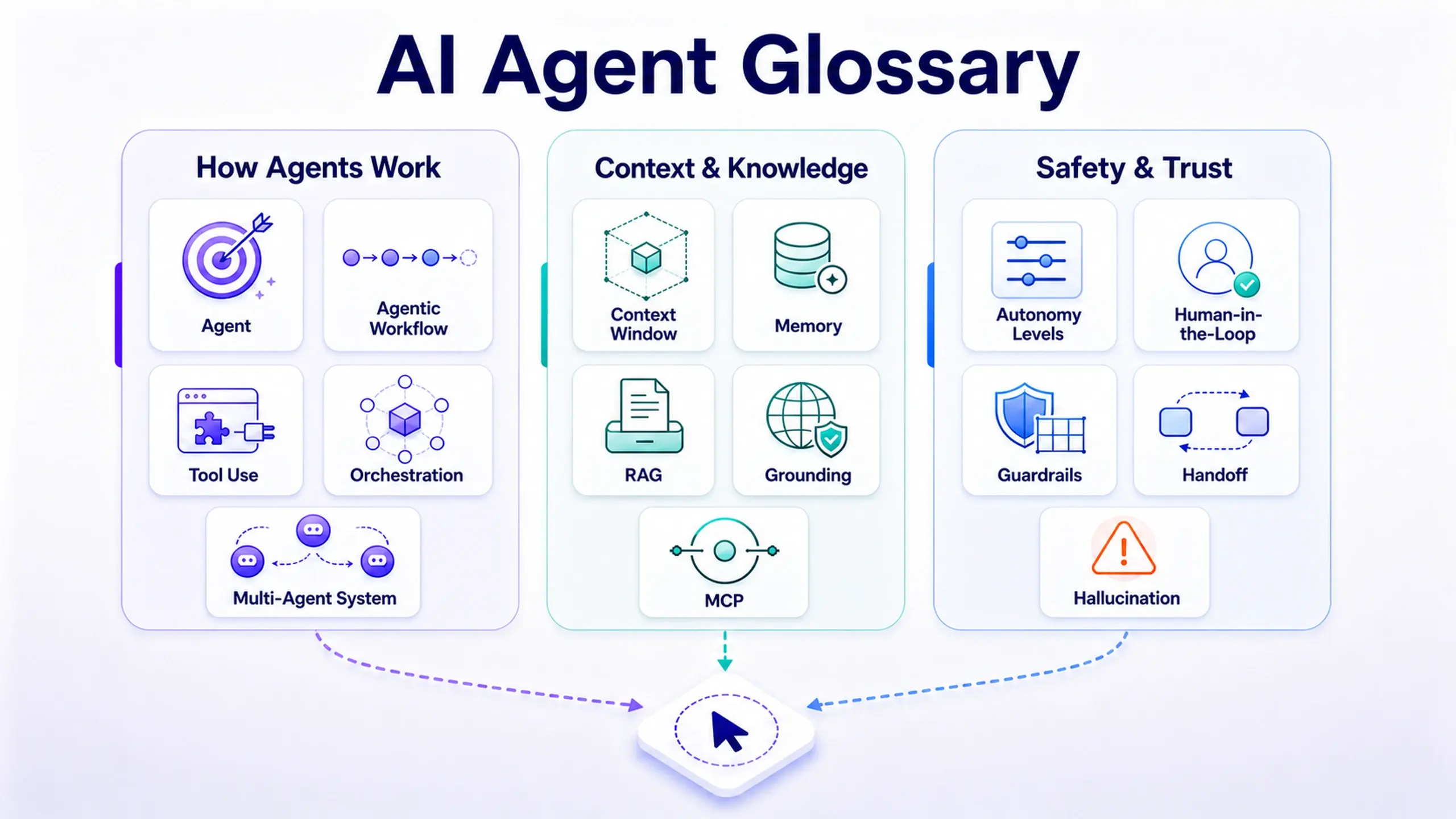
- Learn the vocabulary: human-in-the-loop, confidence, explainability, delegation, MCP. You'll be in conversations where these terms are used loosely; knowing them precisely is an advantage. The AI agent glossary for designers is a good starting point.
- Write clearly. Prompts, capability descriptions, and error messages are all writing. Clear writers have a structural edge in AI products.
If you're mid-level
- Design for failure first. For every AI feature, spec the wrong-output, low-confidence, and missing-access states before the happy path.
- Own the friction decisions. Be the person who can explain where review is required and why.
- Read your product's API and docs as a user. If an agent tried to use your product today, where would it get stuck?
- Learn enough technical context to talk with engineers about context, tools, and permissions. My earlier piece on scaling product design with AI and technical skills covers what's worth learning.
If you're senior or leading
- Put agents on the persona list. Biilmann's point applies here: if agents are a real audience for your product, they deserve the same explicit design attention as any other user type.
- Define autonomy levels as product policy. Which actions can agents take alone, which need approval, and who decides? That's a design and product decision, not only an engineering one.
- Guard against agent washing internally. Ask whether a proposed "agent" actually acts with independence, or is an assistant with a new label. The design work differs.
- Build the oversight surfaces early. Logs, approvals, and reversibility are hard to retrofit after customers have already lost trust.
The same skills, at three levels
| Skill | Beginner | Mid-level | Senior |
|---|---|---|---|
| Research | Interview and observe | Study trust and delegation behavior | Set research strategy for human and agent users |
| Interaction design | Flows and states | Failure, confidence, and correction states | Autonomy levels and oversight systems |
| IA and content | Navigation and labels | Capability descriptions and docs | Product-wide structure for agents and people |
| Collaboration | Work with PM and engineering | Co-define evaluation criteria | Shape AI policy and governance |
Common mistakes in the move from UX to AX
I see these most often, in my own work and in products I study.
- ✕ Treating "add AI" as a reason to skip research. Less predictable output needs more testing, not less.
- ✕ Removing friction everywhere. Some friction is a safety feature. Keep it where mistakes are expensive.
- ✕ Giving an agent autonomy without reversibility. If an action can't be undone, the agent should ask first, every time.
- ✕ Designing for agents at the expense of people. Agent-friendly APIs don't excuse a confusing human interface. Both personas count.
- ✕ Over-designing personality. A name and a warm tone raise expectations without raising competence. Add persona only where it helps people direct the agent.
- ✕ Calling an assistant an agent. Mislabeling sets expectations the product can't meet, and users notice fast.
Frequently asked questions
Is UX dead now that AI agents exist?
What's the difference between AI Experience and Agent Experience?
What's the difference between Agent UX and Agent Experience (AX)?
Do I need to code to design for AX?
Will AX replace UX job titles?
Where should a team start?
Start with one feature and one question
The shift from UX to AX is less dramatic than the acronyms suggest, and more demanding.
The craft didn't change. The number of actors the experience has to work for did:
- the person at the controls,
- the person delegating to AI,
- and the agent acting on that person's behalf.
You don't need to master all three at once. Take one feature you're working on this week and ask the question that matches its layer:
- Can people use it?
- Can people trust and correct it?
- Can an agent use it for someone, while that someone stays in control?
If you can answer the question that applies, you're already doing AX work.
Before you apply this to your product
- Locate one current feature on the three layers: UX, AI Experience, or Agent Experience
- For AI features, spec the wrong-output and low-confidence states before the happy path
- Decide where human review is required, and make that boundary visible in the UI
- Read your product's API, docs, and error messages as if you were an agent
- Add "AI agent" as an explicit user type in your next spec, if agents are a real audience
- Test with real people, especially on what they're willing to delegate
This post was edited with AI assistance for clarity and formatting.

Sanjay Shrestha
Senior Product Designer · CUA™ Certified
15+ years designing enterprise SaaS, B2B, and government digital products. Currently at Decisions.
Keep Reading