Agent UX
Part of AI Product Design →What Is Agent UX? A Framework for Where AI Is Reshaping Product Design
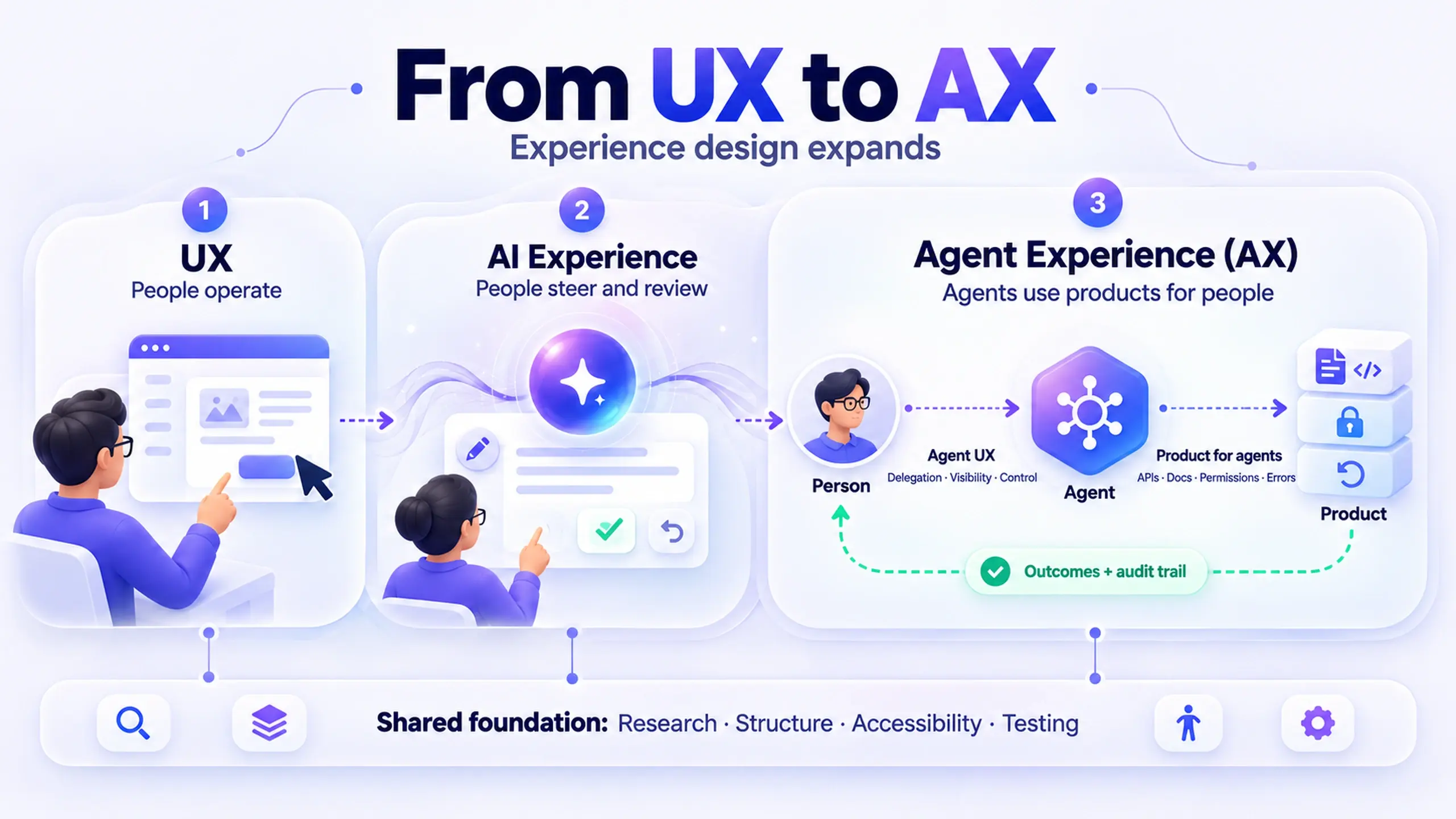
UX isn't being replaced by AI. It's growing a third layer: Agent UX. A working model for what each layer covers, and why it catches most teams unprepared.
If you've felt like "UX" now covers three different jobs depending on who's talking, you're not imagining it. A researcher planning a usability test, a designer arguing about confidence indicators on an AI suggestion, and someone naming the personality of a support agent are all doing "UX work." They're just not doing the same UX work.
Agent UX is the newest and narrowest of the three: it's the practice of designing how an AI agent behaves as an actor in a product, not just a feature inside one. That includes its persona, how it handles being wrong, how much initiative it takes without asking, and how it earns (or loses) a user's trust over a series of interactions rather than a single screen.
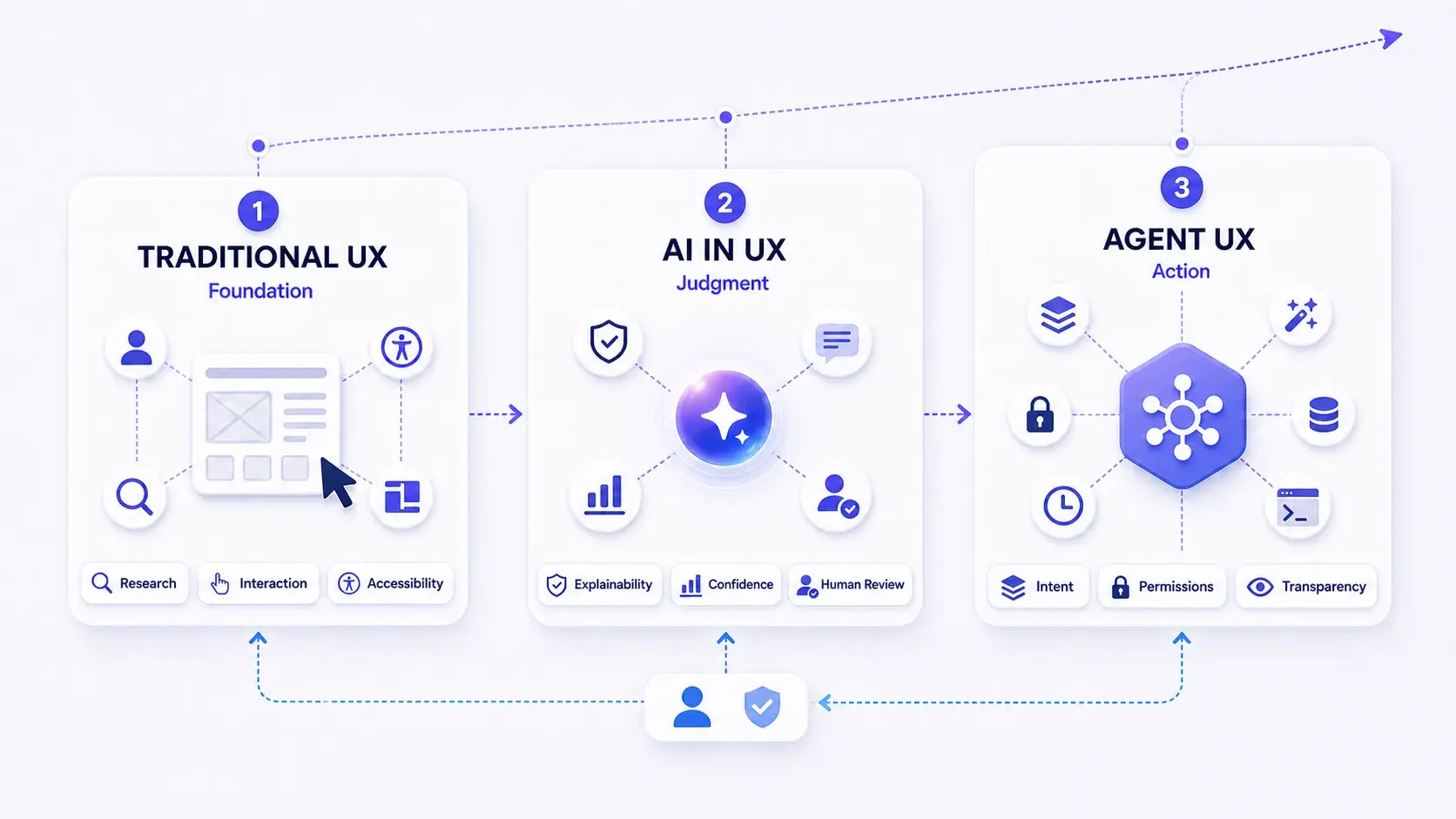
The useful way to think about this isn't "old UX vs. new UX." It's three layers that stack:
- Traditional UX: the research, structure, and craft that every digital product still needs, AI or not.
- AI in UX: the new judgment calls that show up once AI is embedded somewhere in a product's logic.
- Agent UX: the narrower, newer specialty of designing an AI agent that acts with some autonomy, not just responds to input.
None of these layers retires the one below it. A product can need all three at once, or just the first. The rest of this article walks through what each layer actually covers, where the boundaries get fuzzy, and how to tell whether your team genuinely needs the third layer or is just relabeling the second one.
Why the three-layer split matters more than a single "AI UX" bucket
Most write-ups treat "AI and UX" as one undifferentiated topic: a list of tools, a list of best practices, done. That flattens a real distinction. Designing how a product explains an AI-generated recommendation is a different problem than designing how an autonomous agent decides when to ask permission before acting. The first is still fundamentally about a human evaluating output. The second is about a system that takes actions with consequences before a human reviews them.
Microsoft's design team, in its own framework for agent design, puts a version of this distinction plainly: an agent is "an AI assistant designed to execute tasks, working with or for humans," built from instructions, knowledge, actions, skills, and memory, while an agentic system involves multiple such agents "operating autonomously with limited direct supervision across complex environments." That's a meaningfully different design brief than a chatbot that answers questions and stops.
Here's what that means for your team: if what you're building is a feature that uses a model to generate or summarize something a person then reviews, you're working in layer two, AI in UX. If what you're building takes multi-step action on a user's behalf, with some independence between "the user asked" and "the outcome shipped," you've crossed into layer three, Agent UX, and the design questions change accordingly.
Layer 1: Traditional UX is still the foundation, not a phase you graduate from
Traditional UX is everything that made a digital product usable before "AI" was a design consideration at all: user research, information architecture, interaction design, visual design, accessibility, usability testing, journey mapping, service design, and problem definition. None of it becomes optional because a feature has a model behind it.
If anything, the opposite is true. A feature whose output is less predictable needs more usability testing, not less, because you can no longer assume the interface behaves the same way twice. A search results page has one failure mode: bad ranking. An AI-generated summary has several: wrong, vague, confidently wrong, or right but presented in a way the user doesn't trust. Traditional usability testing is exactly the practice built to catch that kind of variability, and it doesn't get replaced by a model performing well in an eval.
The mistake worth naming directly: treating "we added AI" as a reason to skip the research and testing you'd normally do. It's a reason to do more of it, earlier, because the range of things that can go wrong just got wider.
Layer 2: AI in UX is the judgment layer, not a tool list
Once a model is doing real work inside a product, whether that's ranking, generating, summarizing, or predicting, a second layer of design decisions shows up that traditional UX training doesn't automatically prepare you for. A few of the concepts that live in this layer and what they actually mean in practice:
| Concept | What it actually means | Design implication |
|---|---|---|
| Explainability | Can the user tell why the AI produced this specific output? | Show reasoning or sourcing near the output, not in a separate help page |
| Confidence and accuracy | Is the AI's own uncertainty visible, or hidden inside a confident-sounding sentence? | Differentiate high- and low-confidence output visually, don't treat every output the same |
| Human-in-the-loop (HITL) | Does a person review or approve the AI's output before it takes effect? | Decide explicitly where review is required vs. optional, and make that boundary visible |
| Context awareness | Does the AI's behavior account for what the user is actually trying to do right now? | Design for the surrounding task, not just the isolated prompt |
| Ethical design / bias sensitivity | Whose data trained this, and who does the output underserve? | Test with edge cases and underrepresented scenarios, not just the median user |
| Control | Can the user override, edit, or stop the AI's output? | Never ship an AI output as final if the user has no path to change it |
Two of these deserve more than a table cell.
Human-in-the-loop design is not a checkbox, it's a spectrum of how much say the user actually has. Microsoft Research's widely cited Guidelines for Human-AI Interaction frame this as a design responsibility from the first interaction onward, not something bolted on after a model underperforms. The guidelines call for making capabilities and limitations clear up front, and for supporting efficient correction when the AI is wrong, both of which are UX decisions, not model-tuning decisions.
Confidence and accuracy have to be shown, not just achieved. A model can be accurate and still fail the user if its interface presents every output with the same flat, confident tone. The Nielsen Norman Group's research on trust in AI found that users' willingness to act on an AI's advice tracked with perceived intelligence, not perceived warmth, and that models tuned for warmth actually showed error rates 10 to 30 percent higher than baseline in one cited study. The design takeaway isn't "make the AI sound smarter." It's that visible competence, sourcing users can check, clear reasoning, honest uncertainty, does more for trust than a friendlier tone does.
Trust in an AI feature comes from users being able to verify it, not from the AI being pleasant to talk to.
Layer 3: Agent UX is where the AI becomes an actor, not just an input to a decision
This is the layer the infographic that prompted this article puts at the center, and it's the one most design teams have the least established practice around. Agent UX covers the choices involved in designing something that behaves with a degree of independence: a persona, a voice, a set of things it will and won't do on its own.
AI persona design is the most visible piece: does the agent have a name, a tone, a personality, and if so, how much? This connects directly to a genuine tension worth taking seriously. Nielsen Norman Group's research on degrees of anthropomorphism in generative AI identifies a spectrum from simple courtesy ("please" and "thank you") up through full companionship, where users treat the AI as an emotional partner. Some anthropomorphism is functional, users get better results from an agent they can direct like a colleague ("act as a project manager"). But the same research on trust cited above found that more perceived warmth or emotional capacity actually reduced users' willingness to rely on the AI for consequential decisions. The design implication is specific: give an agent enough personality to be usable and legible, and no more than that, especially in professional or high-stakes contexts.
The rest of this layer breaks down into a few practical design problems:
- Conversational design and conversational intelligence: not just what the agent says, but whether it tracks what's already been said, avoids repeating itself, and recovers gracefully when it misunderstands something.
- Intent clarity: whether the agent correctly identifies what the user is actually trying to accomplish before acting, and what happens when that's ambiguous. This is a bigger deal in agent design than in a standard form, because a misread intent doesn't just show the wrong search result, it can trigger the wrong action.
- Feedback and tone of voice: how the agent communicates progress, uncertainty, or failure, not as decoration but as the primary channel a user has for understanding what's happening.
- Cognitive load: how much the user has to hold in their head to supervise the agent effectively. An agent that requires constant monitoring to use safely has a UX problem, not just a trust problem.
- Agentic dependencies: what the agent actually needs to act (data access, connected tools, permissions) and what the user sees when one of those dependencies is missing. This is the agent-design equivalent of an error state, and it's easy to leave unspecified until it fails in production.
- Trust and transparency: whether the user can tell, at any given moment, what the agent has done, is doing, or is about to do, and whether they can intervene before it's too late to matter.
Microsoft's own framework for agent design lands on a similar core principle from a different angle: "embrace uncertainty but establish trust" by making the agent's certainty levels and reasoning visible, so users don't drift into either blind reliance or constant second-guessing. The same framework is explicit that this layer isn't a default: "not all customer problems need AI," and by extension, not every AI feature needs to be an agent with a persona and independent action. That's a useful check before a team invests in layer three at all.
A quick way to tell which layer you're actually working in
Before adding persona design, tone-of-voice work, or trust-and-transparency patterns to a project, it's worth checking whether the feature actually calls for it:
- If a person reviews every output before it has any effect, you're mostly in AI in UX. Focus on explainability, confidence signaling, and easy correction.
- If the system takes multi-step action with limited supervision between the request and the outcome, you're in Agent UX, and persona, intent clarity, and dependency visibility become load-bearing design decisions, not polish.
- If there's no model involved at all, or the model just powers a static ranking or classification with no generated language, you may not need either of the newer layers. Traditional usability and interaction design still cover it.
Getting this wrong in one direction, applying agent-level persona and trust design to a plain review-and-approve feature, tends to make something simple feel needlessly elaborate. Getting it wrong in the other direction, treating a genuinely autonomous agent like a static feature with no persona or dependency design, tends to produce something that feels untrustworthy the first time it acts on incomplete information.
Where this framework has real limits
A few honest caveats, because this model, like most three-part frameworks, simplifies a messier reality:
- The boundaries between layers are not hard lines. A feature can sit partly in AI in UX and partly in Agent UX depending on which part of the flow you're looking at. Treat the layers as a lens, not a strict classification system.
- This isn't an established industry taxonomy. The three-layer framing here builds on a shared visual model of how the discipline is evolving, but it's an interpretation, not a standards body's definition. Different teams will draw these lines slightly differently, and that's fine as long as the underlying design questions get asked.
- Adding a persona is a decision with a real cost, not a free upgrade. Every anthropomorphic choice, a name, a tone, first-person language, raises the bar for how the agent needs to perform, because users hold personified things to a different standard than they hold plain tools.
- Most products don't need layer three at all. If your AI feature generates something a person reviews and acts on themselves, you likely need better explainability and confidence design, not an agent persona.
Common questions about Agent UX
Is "Agent UX" a real job title yet?
Does Agent UX replace traditional UX skills?
What's the real difference between "AI in UX" and "Agent UX"?
Should every AI feature have a persona?
Start by mapping what you're actually building
The most useful first step isn't picking a framework and running with it. It's taking one AI feature your team is currently shipping or planning, and honestly locating it: is it AI-assisted output a person reviews, or is it an agent acting with some independence? That answer determines whether you need better confidence signaling and explainability, or whether you need to invest in persona, intent clarity, and dependency design as first-class parts of the spec.
If your team already has strong traditional UX practice, that foundation doesn't need to be rebuilt for either of the newer layers. It needs to be extended, deliberately, into whichever one your product actually calls for.
Before you apply this to a current project
- Identify one AI feature currently in flight and locate it on the three-layer model
- For features in the AI-in-UX layer, confirm confidence and explainability are visible, not just accurate
- For features in the Agent UX layer, spec out what the agent depends on to act, and what the user sees when a dependency is missing
- Before adding any persona or tone-of-voice work, confirm the feature actually benefits from being directed like a delegate rather than used like a tool
This post was edited with AI assistance for clarity and formatting.

Sanjay Shrestha
Senior Product Designer · CUA™ Certified
15+ years designing enterprise SaaS, B2B, and government digital products. Currently at Decisions.
Keep Reading