From Traditional to AI-Native Product Design: How I Rebuilt My Design Process Around AI Context
The real change AI brought wasn't faster screens. It was a persistent AI context that carries the product, design system, and past decisions.
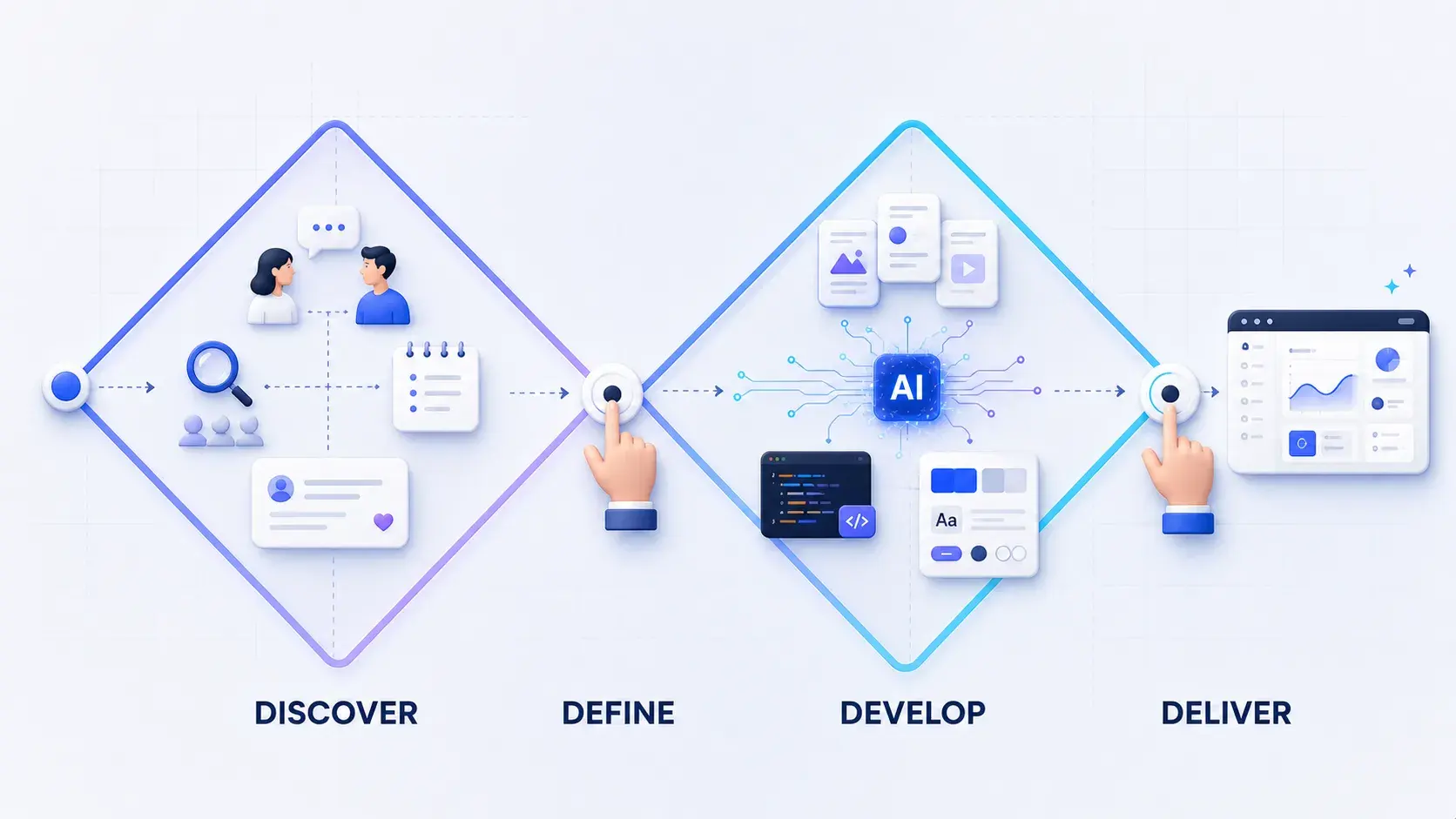
For years, my design process followed the same path: understand the problem, research it, define it, explore solutions, design them, test them, build them, iterate. The tools changed every year. The path never did.
AI didn't just change the tools this time. It changed the path.
AI-native product design isn't about generating screens faster. It's about giving AI a memory: a persistent layer of context about the product, the users, the design system, and every decision made so far. With that memory, AI can help through the whole design process, not just answer one question at a time.
That's what this article is about: not a list of tools, but the system behind them, and how it changed my day-to-day work.
If you want a step-by-step look at specific AI techniques mapped onto a design framework, Where AI Actually Fits in the Product Design Process covers that in more detail. This piece is the bigger picture: why the shift happened, what this kind of AI context looks like, and how it changes what a designer actually spends time on.
AI-assisted versus AI-native: why the distinction matters
Most people's first experience with AI in design work looks the same. Open a chat. Explain the project. Ask a question. Get an answer. Close the tab. Next session, explain the project again. That's AI-assisted design. It's useful, and it's also where most designers stop.
AI-native design starts from a different idea: the AI shouldn't need the project explained every time. Give it access to the product context, the design rules, the design system, and the research already done, and it can reason about a new problem the way a teammate of six months would, not a smart stranger who just walked in.
The difference isn't which model you use. It's whether the AI is working inside real context, or starting from zero.
| AI-assisted | AI-native | |
|---|---|---|
| How a session starts | You re-explain the project every time | The AI reads existing context files first |
| What the AI knows | Only what's in the current prompt | The product, the design rules, the design system, past decisions |
| What it feels like | A smart stranger who just joined | A teammate who's been on the project for six months |
| What you have to do | Nothing extra, just chat | Write and keep updating a few project files (more on this below) |
If you already use ChatGPT or Claude for design work, you're doing AI-assisted design. To move toward AI-native, the only thing you actually need to change is where your project's context lives, from your head and old chat threads, into a file the AI can read before you ask it anything. The next section shows exactly what that file looks like.
The traditional process, compressed
Before AI, a typical project moved through one long sequence: product context, research, competitive analysis, personas, ideation, information architecture, user flows, wireframes, visual design, interaction design, prototyping, usability testing, development handoff, QA, iteration.
The process worked. But it also buried designers in manual work that had little to do with real design judgment:
- Manually collecting and organizing requirements from product managers, developers, customers, and support conversations
- Creating accounts on competitor products, capturing screenshots, and building comparison tables by hand
- Reviewing interview notes line by line to extract goals, behaviors, and pain points
- Redrawing user flows for every edge case, error state, and recovery path
- Rebuilding wireframes screen by screen for every alternative worth comparing
None of that is design, not in the sense of judgment and decision-making. It's information processing, and it ate up most of the time a project actually had. The more of that processing a designer had to do by hand, the less room was left to explore. Two days might realistically produce five ideas. Fifty was never on the table.
The real shift: building a project-specific AI environment
What actually mattered wasn't a faster way to do any one of those steps. It was giving AI a layer of context to read before doing any of them.
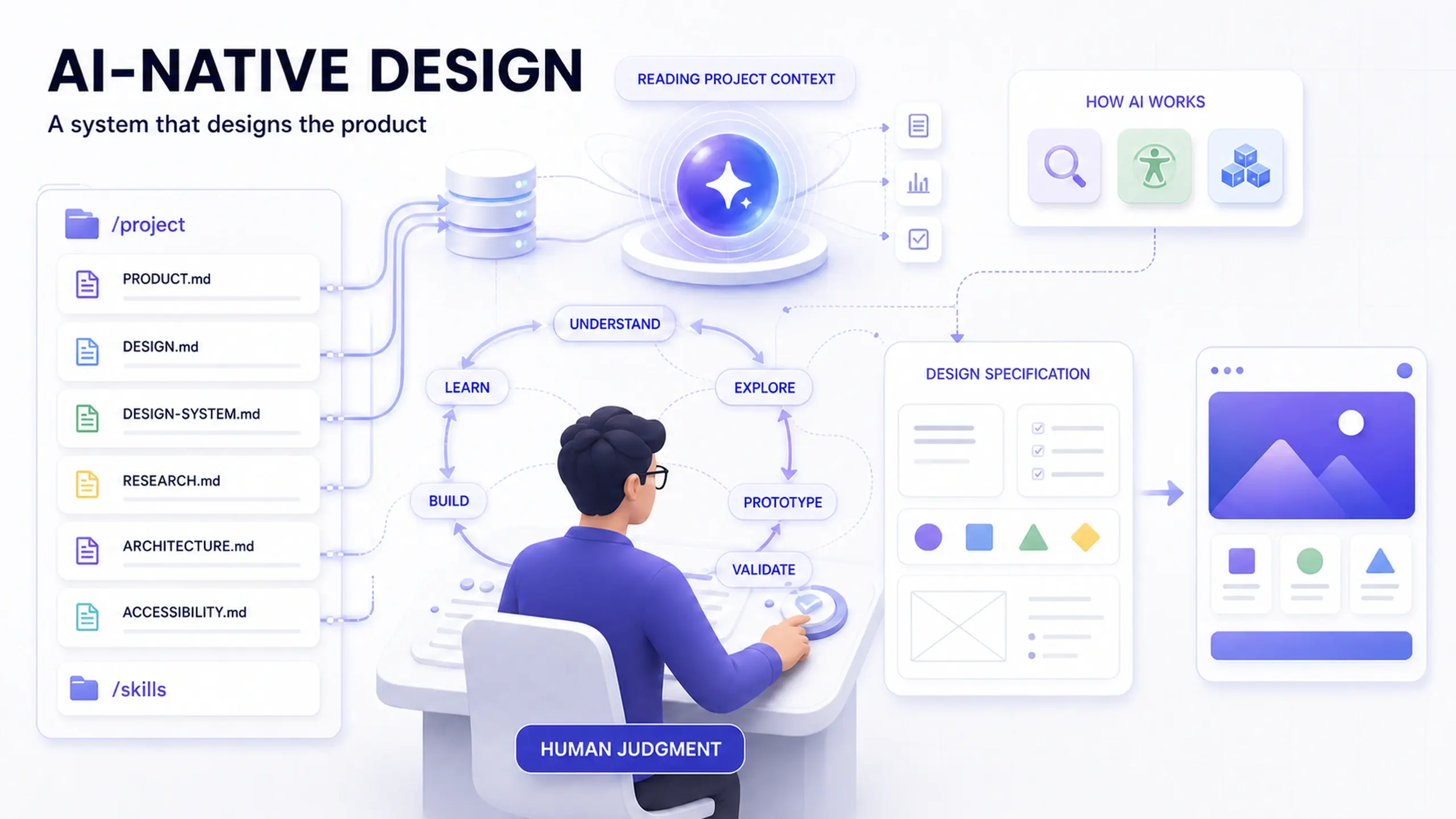
Instead of starting every AI conversation from zero, the project itself carries its own context, structured as a small set of files:
/project
│
├── PRODUCT.md
├── DESIGN.md
├── DESIGN-SYSTEM.md
├── RESEARCH.md
├── ARCHITECTURE.md
├── ACCESSIBILITY.md
└── /skills
The filenames don't matter. What matters is the idea: before you ask AI for help, it should already know what you're building, who it's for, how it should behave, how it should look, what the constraints are, and what's already been decided.
| File | What it holds | Why it matters |
|---|---|---|
| PRODUCT.md | Vision, target users, jobs to be done, key workflows, terminology, business and platform constraints, known UX problems | The foundation everything else builds on. The product doesn't need re-explaining every session. |
| DESIGN.md | UX principles, layout and interaction rules, responsive behavior, accessibility requirements, form, modal, empty-state, and error-state conventions | Gives AI something to design against, instead of inventing its own rules |
| DESIGN-SYSTEM.md | Tokens, typography, color, spacing, components, variants, states, icons, usage guidelines | The difference between "create a dropdown" and "use the existing Select component." That matters a lot once AI is writing real interfaces or code. |
| RESEARCH.md | Findings, customer feedback, interview notes, usability results, support issues, analytics observations, open questions | Keeps research from getting buried in a deck nobody reopens. New decisions can be checked against real evidence. |
Checking a file like this into the project, so AI loads it automatically, follows the same idea as Anthropic's own CLAUDE.md convention for Claude Code: a plain markdown file with the context a new collaborator, human or AI, would otherwise need to be told from scratch. It's a good habit even without AI reading it.
Skills: telling AI how, not just what
Context files tell AI what it needs to know. Skills tell it how to do a task, the same idea behind Anthropic's Agent Skills: a reusable set of steps the AI can load on demand, instead of you re-explaining it every time.
A few project-specific skills worth building early:
- UX review: evaluate a proposed experience against usability heuristics, accessibility requirements, and known user needs
- Accessibility audit: check components and flows against accessibility requirements
- Design-system audit: flag custom UI that should be using existing components or tokens instead
- User-flow review: look for missing states, dead ends, permission gaps, and unhandled errors
- Design-to-code: translate an approved design while respecting the project's components, tokens, and engineering conventions
Each one turns an instruction you used to repeat in every prompt into something the AI already knows how to do.
From a linear pipeline to overlapping loops
The old process was a pipeline: research, then define, then design, then prototype, then test, then build. Each stage waited for the one before it. Going back to an earlier stage was expensive, so it rarely happened until something broke.
With a lasting project context, the work stops feeling like a pipeline. It starts feeling like a loop: understand, explore, prototype, validate, build, learn, and back to understand again. Except now "understand" includes everything you learned last time.
Every iteration improves not only the product. It improves the context the AI uses to help design the product.
That's the part worth noticing. A context file that only reflects day one goes stale, just like any other document. But one you update after every research round, every usability test, and every shipped feature keeps getting more useful, for the AI and for your team.
Prompting becomes part of the design specification
Once a project has real context behind it, a prompt matters the way a design brief always has. A vague instruction gives you a generic result, whether a human or an AI is on the other end.
Weak version:
- Build a settings page.
- Make this look more modern.
- Add a way for users to invite teammates.
Improved version:
- Context: why does this screen exist?
- User: who's using it?
- Goal: what should they accomplish?
- Constraints: what technical or product limitations exist?
- Design system: which existing components and tokens apply?
- States: what happens when something fails?
- Accessibility: how should keyboard navigation, focus order, and screen readers behave?
- Success criteria: what would make this solution work?
Writing the improved version takes the same care a good design brief always took. The difference: this one goes to a collaborator that can act on it right away, using your project's own components and rules instead of guessing.
What this changes about the day-to-day work
None of this removes the usual steps of product design. It changes how much of each step is manual versus AI-assisted, and where a designer's judgment actually goes.
| Phase | Traditional approach | With a project AI context | Where judgment still lives |
|---|---|---|---|
| Discovery | Manually collect and synthesize | AI-assisted clustering of documentation, feedback, and analytics | Deciding what the real problem is |
| Competitive analysis | Manual research, screenshots, comparison tables | AI-accelerated collection and pattern-finding | Deciding which competitors actually matter |
| Personas | Manual synthesis of interview notes | AI-assisted clustering of findings | Confirming personas against real evidence, not invented ones |
| Ideation | Workshops and sketches, limited by time | Dozens of AI-generated directions to react to and cut down | Recognizing which idea the rest of the product depends on |
| Wireframes and prototypes | Screen-by-screen, one alternative at a time | Rapid, functional prototypes generated from context and tokens | Judging whether an interaction actually works for people |
| Development handoff | Static specification handed to engineering | Prototype or code brought closer to implementation before handoff | Deciding what's good enough to ship |
The tasks that shrink are mostly information processing: repetitive documentation, formatting research, making disposable variations, re-explaining the same context every conversation. The tasks that grow were always the real job: framing the right problem, weighing alternatives, questioning assumptions, and deciding what deserves to exist.
That's also why the tools stop being interchangeable once you use more than one. ChatGPT, Claude, Gemini, and Perplexity end up doing different kinds of thinking, not competing for the same job:
| Tool | Where it earns a place in this workflow |
|---|---|
| ChatGPT | Reasoning through ambiguous product questions, framing problems, structured critique |
| Claude | Working with large project contexts, documentation, repositories, and longer-running project work |
| Gemini | A second reasoning or multimodal perspective, useful for comparing interpretations |
| Perplexity | Current external research: sources, competitors, and market information outside the project |
This is one way of working, not a ranking. The point isn't which tool wins. It's that treating them as interchangeable wastes what each one is actually good at.
Where AI should not replace the designer
Speed brings its own risk. AI can give a confident, well-formatted answer even when the assumption underneath it is wrong, and nothing in the interface warns you when that happens.
A few places where that risk is highest:
- Generated personas are guesses, not evidence. AI can cluster and summarize real interview data well. It can't invent evidence about users it never talked to. A persona with no research behind it is just a guess dressed up as a finding.
- Unrestricted UI generation drifts from the product. Without a design system to generate against, AI makes interfaces that look fine on their own but don't belong to your product. That's exactly what the context files above are for.
- Usability testing still needs real users. AI can help write test scripts and cluster findings afterward. It can't replace watching a real person struggle with a real interface.
- Research calls, ethics, and stakeholder alignment stay human. AI can support these with structure and synthesis. It shouldn't make the actual decision, because the responsibility doesn't transfer with the task.
The common thread: AI can generate, analyze, and prototype. It can't decide what deserves to exist, or whether it actually works for the people using it.
Questions designers ask about AI-native design
Is this just using ChatGPT or Claude more often?
Do I need to know how to code to set this up?
Will this replace product designers?
Where should I actually start?
Designing a system that designs the product
The biggest change AI brought wasn't image generation, faster wireframes, or code generation. It was a shift from designing individual artifacts to designing a system that helps design the product: the context it reasons from, the rules it respects, the evidence it checks against, and the skills it repeats.
That shift makes a designer's job less about producing every step by hand, and more about answering a few questions well: what problem are we solving, what context matters, what should the system respect, what evidence backs the decision, what's good enough to ship. AI can generate, analyze, and prototype fast. Deciding what deserves to exist, and whether it actually works, is still the part that doesn't get automated.
Start small. Pick one real project. Write one context file this week, most people start with PRODUCT.md, and use it in your next AI-assisted conversation. You'll usually notice the difference in that first session.
Before you build your own project context
- Write a first-draft PRODUCT.md: vision, users, jobs to be done, known constraints
- Add a DESIGN.md capturing the UX rules and conventions you already enforce informally
- Point AI at your actual design tokens and components instead of describing them from memory
- Turn one repeated instruction (a UX review, an accessibility check) into a written skill
- Keep validating with real users; a faster prototype is not the same thing as a tested one
This post was edited with AI assistance for clarity and formatting.

Sanjay Shrestha
Senior Product Designer · CUA™ Certified
15+ years designing enterprise SaaS, B2B, and government digital products. Currently at Decisions.
Keep Reading