User Research Methods That Actually Change Product Decisions
Generative research, evaluative testing, JTBD, and affinity mapping — explained through the real decisions they changed, not textbook definitions.
A practical series that explores the concepts, frameworks, and decision-making behind great digital products. Each article goes beyond definitions to explain when these concepts matter, why they matter, and how experienced product designers apply them in real-world work. This is Part 1, covering user research. Next up: Information Architecture.
There's a pattern I've seen across design teams, and honestly in my own early career. Someone asks about user research methods, and the answer becomes a recitation:
"Generative research is about understanding problems before designing. Evaluative research validates your designs."
Correct. And completely forgettable.
What separates good research from great research is judgment: not whether you know what a mental model is, but whether you've used one to make a better decision under real constraints. This post covers five core research concepts, not as definitions, but as tools experienced product designers actually use and can speak to with specificity.
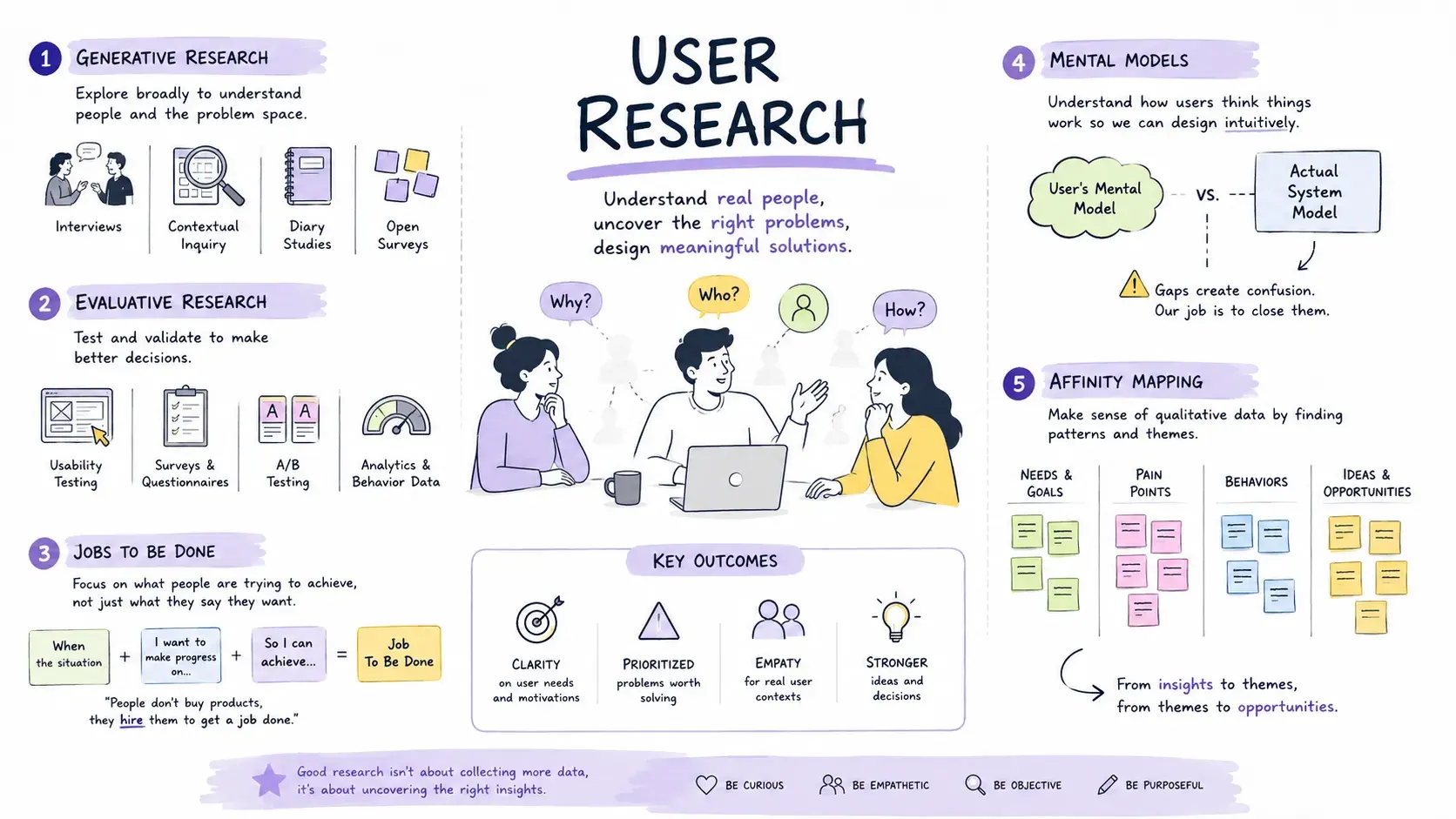
The short version: each method below earns its place by changing something specific. Generative research changes the problem statement. Evaluative research changes the interface. Jobs to be done changes the feature. Mental models change the interaction pattern. Affinity mapping changes what the insight even is. The rest of this article is what that looks like in practice.
Five methods, five different questions
Before the deep dive, here's how these methods relate to each other, and where each one earns its place in a project timeline.
| Method | Question it answers | Best used when | What it changes |
|---|---|---|---|
| Generative research | Are we solving the right problem? | Before requirements are locked in | The problem statement |
| Evaluative research | Can users actually do the task? | Once there's a design to react to | The interface |
| Jobs to be done | What progress is the user trying to make? | When a feature request feels too literal | The feature itself |
| Mental models | What does the user already expect? | Before introducing a new interaction pattern | The interaction design |
| Affinity mapping | What do raw observations actually reveal? | After any round of qualitative research | The insight, and what you build on it |
Skim that table and you already have the shape of this article. Read on for what each row looks like when it's not going well, and the moment it changed a real decision.
Generative Research: Understanding the Problem Before Designing
What most people say: "It's exploratory research done early in the process to understand user needs."
What shows experience: Generative research is how you avoid building the wrong thing with high craft. It's the work that earns you the right to open Figma.
In practice, this looks like contextual inquiry, diary studies, stakeholder interviews, or simply sitting next to someone while they do their actual job. The goal isn't to confirm your assumptions. It's to surface the ones you didn't know you had. Generative research typically happens earliest in a project, before a solution direction is locked in, which is exactly the stage NN/g's guide to matching research methods to project needs recommends for it.
The actual problem was trust, not information overload. No amount of better layout would fix a trust problem.
On one project, I was brought in to redesign a dashboard for operations teams. The brief assumed the core problem was information overload. Three contextual interviews later, the actual problem was clearer: users weren't overwhelmed by information, they didn't trust it. Data was stale. They'd learned to verify everything manually before acting on it.
Generative research changed the entire problem statement. That's the story worth telling.
Where this shows up: in how research reframes a project's scope, changes stakeholder assumptions, or prevents a specific wrong turn before real resources are committed to it.
Evaluative Research: Validating Designs With Real Users
What most people say: "Usability testing to see if the design works."
What shows experience: Evaluative research is a conversation with reality. The question isn't "do users like this?" It's "can users accomplish the goal, and where does the design get in the way?"
That distinction matters because liking and usability are different things. Users will often say they like something while failing to complete the task. What you observe matters more than what they report.
Five sessions. Fifteen minutes each. One label change that removed a top support-ticket category.
I've run evaluative sessions where five participants couldn't find a feature the product team was certain was obvious. Not because users were unsophisticated, but because the label was written in internal jargon that meant nothing to someone outside the company.
Five sessions sounds small, but it usually isn't. Usability Testing 101, NN/g covers the mechanics of a session like this, and NN/g's own research on sample size is the reason a handful of focused sessions is one of the most cost-effective ways to validate a design: it tends to surface most of the usability problems worth fixing well before you reach double digits.
In real product work: the value shows up in a specific finding that was counterintuitive, or a case where observed user behavior contradicted stakeholder confidence.
Jobs to Be Done: What Users Are Actually Trying to Accomplish
What most people say: "It's a framework for understanding user goals beyond features."
What shows experience: JTBD reframes the question from "what do users want?" to "what progress are they trying to make, and what's getting in the way?"
- Feature thinking: "Users need a calendar view."
- JTBD thinking: "Users need to coordinate across teams without missing dependencies."
One constrains the solution space. The other opens it. The framework traces back to Clayton Christensen's core claim that people don't buy products, they hire them to make progress on a specific job, and NN/g's own comparison of personas against jobs-to-be-done makes the practical distinction well: a persona describes who someone is, while a job describes what they're trying to accomplish, and it's usually the second question that changes a roadmap.
On a scheduling-tool project, the stated requirement was a Gantt chart. JTBD interviews revealed the real job: project leads needed to have confident conversations with executives about timeline risk, not to manage tasks themselves. The insight shifted the team from building a task-management view to building an exception-and-risk summary view. A completely different interaction model, built on the same underlying data.
Where this shows up: in the moment understanding the underlying job changes what a team builds, not just how they design it. The same instinct, asking what job a literal request is standing in for, carries over into how you work with AI design tools, where the words in a prompt are rarely the whole story either.
Mental Models: How Users Expect Products to Work
What most people say: "The assumptions users bring to a product based on prior experience."
What shows experience: Mental models explain why technically correct designs still confuse people. Users don't read interfaces neutrally. They arrive with strong expectations built from every product they've used before.
When your interface violates those expectations, even subtly, you create friction that feels like a product bug even when it isn't.
The practical implication: before you design a new pattern, ask whether it matches the mental model users already have, or whether you're asking them to learn something new. Sometimes new is necessary. Usually it costs you. NN/g's own treatment of the concept frames the goal the same way: match the system's conceptual model to the user's existing mental model, rather than the other way around.
I worked on an enterprise workflow tool that introduced "adaptive approval chains" that rerouted based on conditions. Technically elegant. Completely mismatched with how approvers thought about their role. They expected a simple sequence: request comes in, I approve or reject, done. The new system created uncertainty about when approvals were final. We added an explicit "this is now locked" confirmation state, not because it was technically needed, but because it resolved the mental-model gap.
In real product work: the payoff is a design decision driven by mapping to existing expectations rather than introducing new patterns for their own sake.
Affinity Mapping: Turning Research Into Actionable Insights
What most people say: "Organizing sticky notes into themes after research sessions."
What shows experience: Affinity mapping is only as useful as the quality of the observations going into it. If your notes are paraphrased interpretations, the clusters you form are your assumptions wearing a research costume.
The method requires raw observations, things users said or did, not what you think they meant. This is essentially NN/g's affinity diagramming process: sorting real data into groups that emerge from the data itself, rather than imposing categories on it beforehand. The sequence matters:
- Capture discrete observations, one per note, in the participant's own words or actions.
- Move notes without pre-sorting. Resist grouping while you're still capturing.
- Let clusters emerge from proximity and repetition, not from a hypothesis you brought into the room.
- Name each cluster by what it reveals, not by what you expected to find.
The uncomfortable clusters, the ones that don't fit your hypotheses, are usually where the real insight lives.
We almost ignored a cluster of just six notes. It became the feature users rated highest in follow-up evaluation.
On a government digital-service project, we ran twelve sessions and produced over 400 observations. The cluster we almost ignored was small: just six notes about users calling a family member for help during the process. We nearly grouped it under "complexity." Instead we kept it separate and named it: "Users don't trust their own understanding enough to proceed alone." That insight led to a co-completion feature that became one of the highest-rated features in evaluation.
Editorial note (not for publish): visual suggestion, a two-column comparison showing a raw observation ("User picked up their phone and called a sibling before clicking submit") next to a paraphrased conclusion ("User found the form confusing"), with an arrow showing the assumption the paraphrase smuggles in. Suggested caption: "The paraphrase erases the detail that would have surfaced the real insight." Suggested alt text: "Side-by-side comparison of a raw research observation and a paraphrased conclusion, showing how paraphrasing loses the detail behind a finding."
Where this shows up: in how a team handles unexpected or inconvenient clusters, and what the synthesis reveals that individual sessions didn't.
The Pattern Across All Five
Every one of these methods is a way of making decisions with less guesswork. What matters isn't the textbook definition. It's the specific moment the method changed something: the problem statement, the design direction, the product feature, the stakeholder's assumption.
If a team can say "we used X, found Y, and changed Z because of it," that's research doing its job. Everything else is just vocabulary.
Editorial note (not for publish): visual suggestion, a horizontal diagram with five nodes, one per method, each pointing to the specific thing it changes (problem statement, interface, feature, interaction pattern, insight), mirroring the table earlier in the article. Suggested caption: "Five methods. Five different things they're built to change." Suggested alt text: "Diagram showing generative research, evaluative research, jobs to be done, mental models, and affinity mapping, each mapped to the specific project element it changes."
Where These Methods Run Into Limits
None of the above works automatically just because you ran the method.
- These are qualitative tools, not statistical ones. They tell you why something is happening and give you direction, not a confidence interval. If you need to know whether a change actually moved a metric at scale, that's a job for analytics or a controlled experiment, not another round of interviews.
- Timing matters more than technique. Generative research run after a direction is already locked in is wasted effort. Evaluative research run before you know what problem you're solving is premature; you'll get clean feedback on the wrong thing.
- The judgment in these examples took years to build. The same method, run by a less experienced team under deadline pressure, can just as easily produce a confident wrong reframe as a right one. The tool doesn't replace judgment. It channels it.
- Real deadlines push teams to skip straight to evaluative testing on a design nobody validated the underlying problem for. Sometimes that's a reasonable call, the problem really is well understood already, but it should be a deliberate tradeoff, not a default born of running out of time.
Frequently Asked Questions
What's the difference between generative and evaluative research if I only have time to run one?
How many users do I actually need for evaluative research to be worth running?
Do I need a dedicated researcher to do any of this well?
Is affinity mapping still worth doing for a small team or a solo designer?
Start With the Decision You Need to Make
None of these five methods matters because you can define it. Each one earns its place because of the specific decision it's capable of changing: the problem you're solving, the interface you shipped, the feature you built, the pattern you introduced, or the insight you almost missed.
The next time a research method feels like a formality, ask what decision it's actually meant to inform. If you can't name one, that's worth noticing before you schedule another session.
Part 1 of 5 · Product Design Concepts Explained
This post was edited with AI assistance for clarity and formatting.

Sanjay Shrestha
Senior Product Designer · CUA™ Certified
15+ years designing enterprise SaaS, B2B, and government digital products. Currently at Decisions.
Keep Reading